

You click Assemble, but the documents do not generate. You may see a spinning wheel, no progress, or the screen appears frozen. This article explains how to determine whether the system is still working or truly stuck, and what to do next.
How Do I Know If It’s Still Working?
After clicking Assemble, the system displays:
A spinning progress wheel
A message such as: “Assembling [Document Name].xdtpx…”
As the system processes the package, the document name will change as each document is generated. This indicates normal progress.
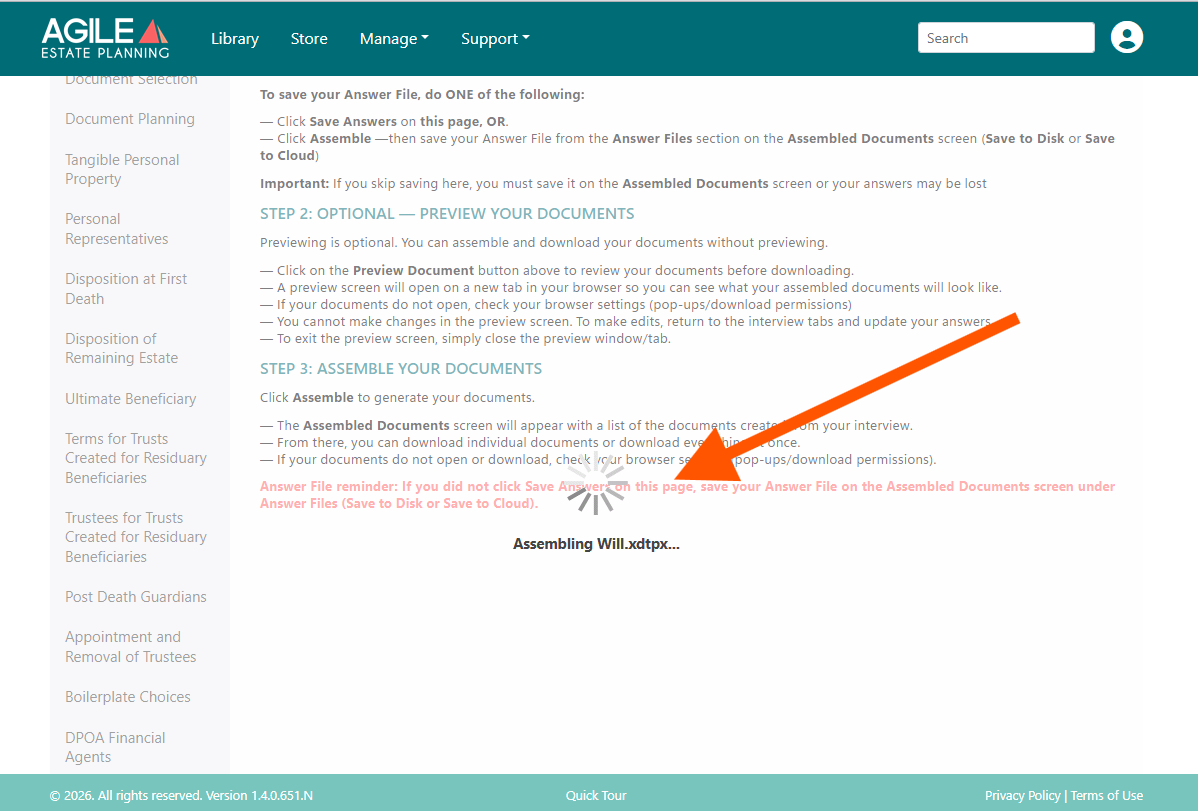
Larger or more complex packages may take one to two minutes to fully assemble. If the document name continues changing, the system is working normally.
How Do I Know If It’s Stuck?
Assembly may be stalled if:
The spinning wheel continues
The “Assembling [Document]…” message does not change for several minutes
No documents load after waiting
If the document name has not updated for several minutes, proceed with the troubleshooting steps below.
Step 1: Click “Library”
Click Library in the top navigation. This can interrupt a stalled session and reset the interface without losing saved answers.
Step 2: Refresh the Browser
If clicking Library does not resolve the issue, refresh the browser tab. Your saved answers will not be lost.
Step 3: Log Out and Back In
If the issue persists:
Close the Agile window or browser tab.
Log out completely.
Log back in.
Reopen the Template Package.
Select the matter and load answers if prompted.
Your previously entered answers should load automatically.
Step 4: Check Your Internet Connection
A temporary loss of internet connectivity is a common cause of stalled assemblies. Confirm your connection is stable and try again.
When to Contact Support
Escalate the issue if:
The system repeatedly stalls on the same document
Multiple users are experiencing the same issue
You receive a specific error message
Please include the template package name, matter name, screenshot, browser type, and time the issue occurred.