

Agile EP offers a 14-day Free Trial for all of its products so you can explore the platform before subscribing.
Accessing Free Trials
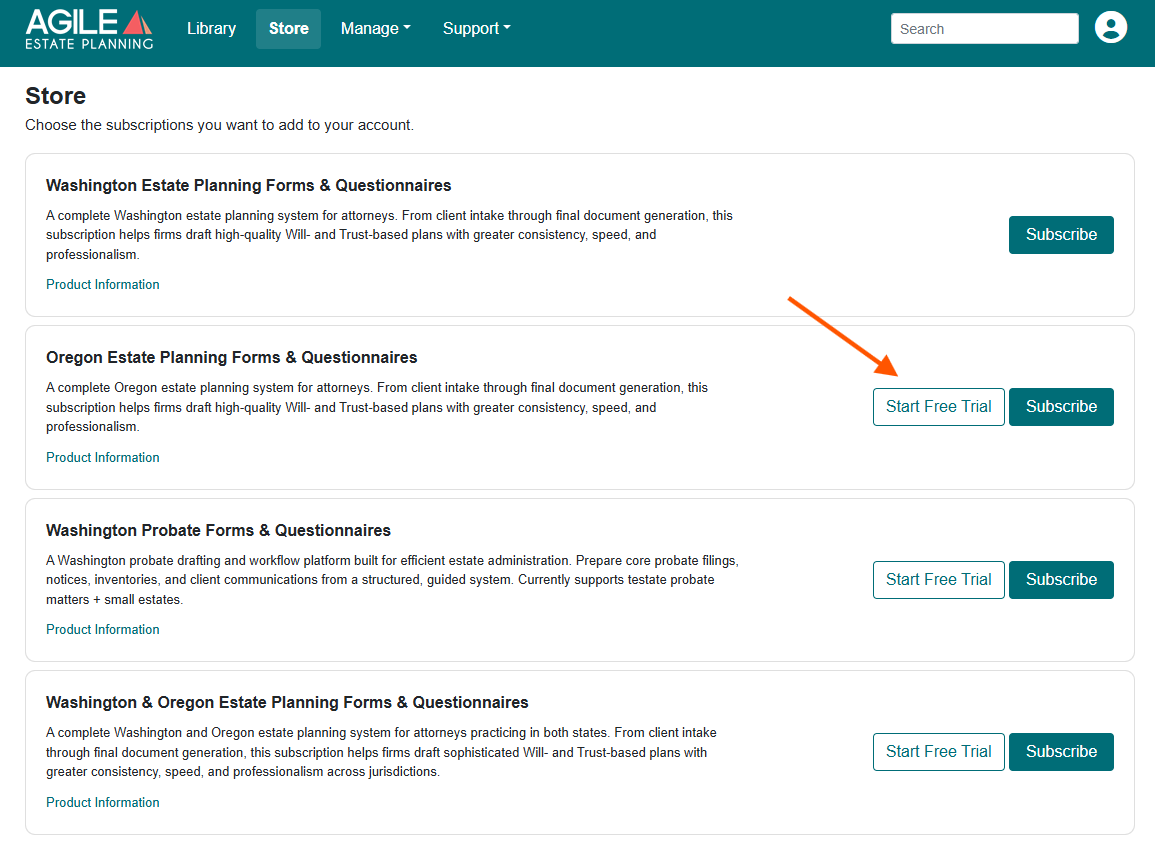
To start a free trial for any product, login to your Agile Estate Planning account here. Then, go to the Store and locate the prodcut you'd like to try. Click on the Free Trial button to begin.
If the Free Trial option appears next to a product in the Store, that trial is available to you. If it does not appear, the trial for that product has already been used.
What's Included?
A Free Trial gives you full access to a specific product for 14 days at no charge.
Trials are product-specific. For example:
You may start a trial for any of the Estate Planning products.
You may separately start a trial for Probate.
How Long Does the Trial Last?
Free Trials last 14 days from the date you activate them. Your trial end date is displayed inside the billing portal. During the trial period, you have full access to the features included in that product.
What Can I Do During the Trial?
During your Free Trial, you can:
Send and receive online questionnaires
Draft and assemble documents and doucment apckages
Explore workflows and features included in that product
The trial is designed to let you fully evaluate how the product works in your practice. Client data entered during the trial remains confidential and in your Agile EP account.
What Happens at the End of the Trial?
At the end of the 14-day period:
If you convert to a paid subscription, your access continues without interruption.
If you do not subscribe, access to that product will end.
Your client data is not deleted, but drafting access for that product will no longer be available unless you subscribe. You will be notified three days before your trial period ends and be offered the chance to add a payment method to your account.
Converting to a Paid Subscription
You can convert to a paid subscription at any time during the trial. Go to: Manage > Subscriptions > Click Billing, Seats & Cancellation to open the billing portal. Select the trial subscription and follow the prompts to subscribe.
You will:
Choose Monthly or Yearly billing
Select the number of users
Enter payment information
Once complete, your subscription becomes active and continues without interruption.
Canceling a Trial
If you decide not to continue, you may cancel the trial subscription before it converts. Go to: Manage > Subscriptions > Click Billing, Seats & Cancellation to open the billing portal. Select the trial subscription and choose Cancel, then confirm when prompted.
If canceled, the trial will remain active through the end of the 14-day period and then expire automatically.
Your Data Remains Intact
Whether you cancel or allow a trial to expire:
Your client matters remain securely stored in your Agile EP account.
You may resubscribe later and regain access to that product’s drafting features.