

The Big Picture
Agile Estate Planning is organized around five core concepts:
- Accounts
- The Store
- Product Subscriptions
- The Library
- Templates Used for Drafting
Each layer builds on the one before it. If something appears missing or unavailable, the explanation can typically be found by tracing access back through this structure.
An account represents your firm or organization. All activity in the system occurs within the context of an account.
At the account level:
- An administrator manages users and permissions
- Users belong to the account
- Product access and billing are controlled
- Subscriptions are activated and managed
When you log in, your access to products and templates is determined by your account’s active subscriptions.
Every account has a Store. The Store is where product access is managed. It is not used for drafting documents or working with client materials.
In the Store, you can:
- View available products
- Start or manage free trials
- Subscribe to products
- Manage existing subscriptions
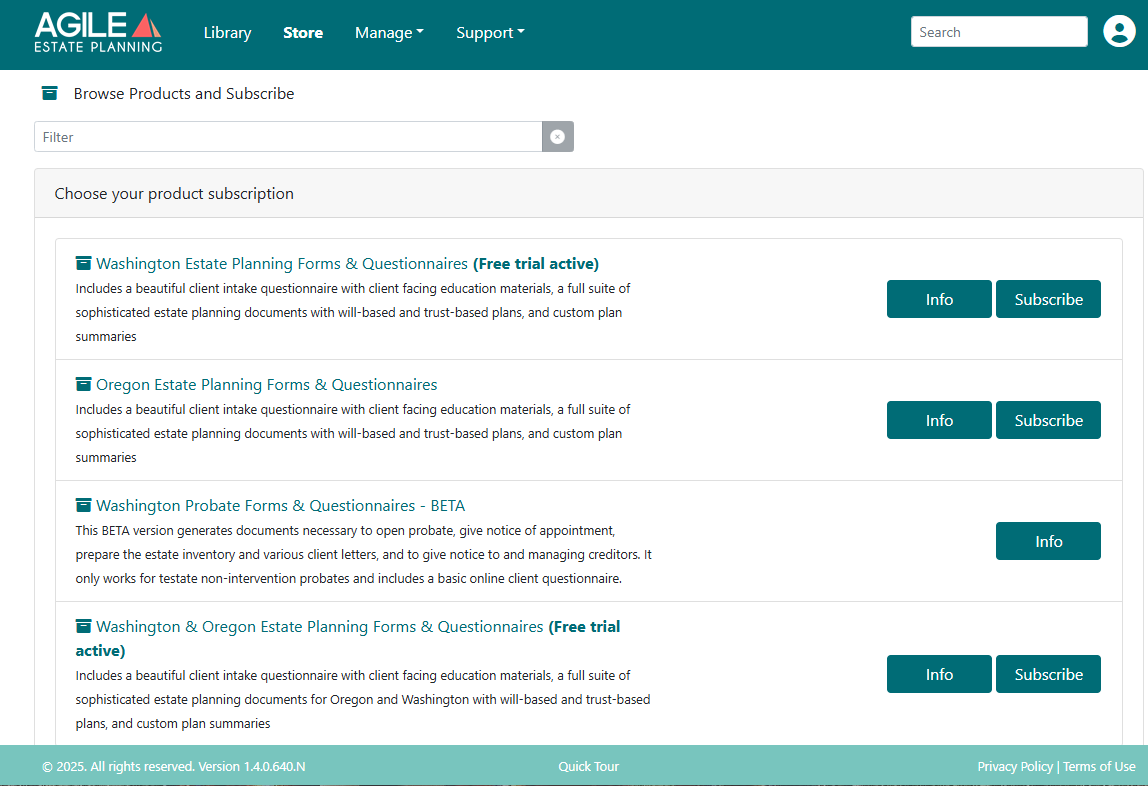
A product subscription unlocks a defined set of materials, typically organized by jurisdiction and practice area.
Examples include:
- Washington Estate Planning Forms & Questionnaires
- Oregon Estate Planning Forms & Questionnaires
- Washington Probate Forms & Questionnaires
- Combined Washington & Oregon Estate Planning products
Subscriptions do not themselves contain documents or questionnaires. Instead, they determine what appears in the Library.
When a product is marked Free Trial Active, your account has temporary access to that product without being billed.
The Library is where subscribed products become usable. Each active subscription appears as its own entry in the Library. Selecting a product opens its folders and templates.
If a product does not appear in the Library, first confirm that the subscription is active in the Store.
Inside each product, templates are organized into folders reflecting practical use.
Common estate planning categories include:
- Client Facing Education Materials
- Client Questionnaires
- Estate Planning Document Packages
- Codicils and Trust Amendments
- Deeds
- Miscellaneous Forms
- Other Trusts
These folders contain drafting templates, not finished documents.
Templates are jurisdiction-specific drafting tools. They:
- Belong to a specific subscribed product
- Pull data from questionnaires and drafting interviews
- Generate draft documents based on structured input
The templates available to you depend entirely on your active subscriptions. For example, a Washington-only subscription exposes Washington templates. Oregon templates will not appear unless your account also has an Oregon or Multi-state subscription.