

Agile Estate Planning includes built-in sample data in every drafting package so you can explore the system confidently, without using real client information. Whether you’re learning a new product, training a team member, or simply curious how a particular planning option works, sample data gives you a safe place to experiment.
For many users, spending a few minutes exploring with sample data is the fastest way to understand how best to use the system before drafting live client documents.
Where Sample Data Fits in the Drafting Process
Drafting in Agile EP follows a consistent structure. For example, if you want to draft a Washington estate plan for a married couple that is Will-based and a mirror-image plan, you’d select the following:
- Locate your product: Washington Estate Planning Forms & Questionnaires
- Select the template folder: Estate Planning Document Packages
- Choose a family scenario: Married Couple
- Choose a drafting template: Will-Based Estate Planning Package (Mirrored Plan for Couple)
Once you select a template, you enter the Drafting Interview.
The “Load Sample Data” Button
On the first page of every drafting interview, you’ll see a button labeled Load Sample Data (or similar language). It’s intentionally placed right at the beginning so you can start exploring immediately, before entering any real client information.
This makes it easy to see how the system behaves without committing to anything.
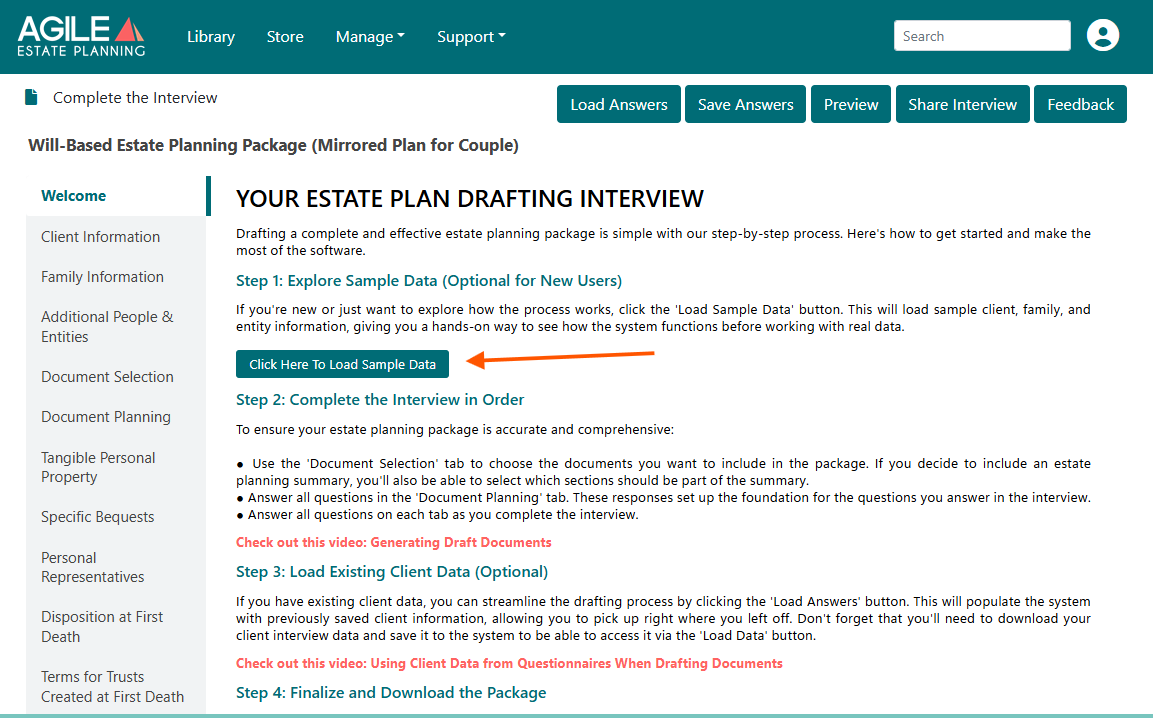
What Happens When You Load Sample Data
When you click Load Sample Data, the system automatically populates the foundational sections of the interview:
- Client Information: Sample names, dates, and basic demographics
- Family Information: A sample spouse and/or children
- Additional People & Entities: Sample charities, fiduciaries and agents
No other sections are completed for you. This approach is intentional.
It gives you just enough structure to:
- See how later questions change based on family relationships
- Test document selections and planning variations
- Observe how certain answers affect the generated documents
You remain fully in control of what to adjust or explore next.
When Sample Data Is Most Helpful
Sample data is especially useful when you want to:
- Train staff on the drafting workflow
- Demonstrate Agile EP to colleagues or stakeholders
- Explore an unfamiliar document package
- Test alternative planning scenarios
- Review document logic without using real client information
Because the data is fictional, you can freely modify it, experiment with it, or discard it entirely.
Important Notes and Best Practices
- Sample data is optional. You may skip it entirely and begin with real client information.
- Loading sample data does not affect your templates or saved work outside the current interview.
If you later want to work with real client information, you can:
- Manually replace the sample answers, or
- Exit and restart the interview without loading sample data.
It’s also helpful to know that Sample Data is different from Load Answers, which is used to reload a previously saved client answer file.