

A questionnaire link can be accessed by anyone who has the link. This allows collaboration when needed, for example, between spouses or with an accountant.
Access to the Link
There are two ways additional recipients can receive the link:
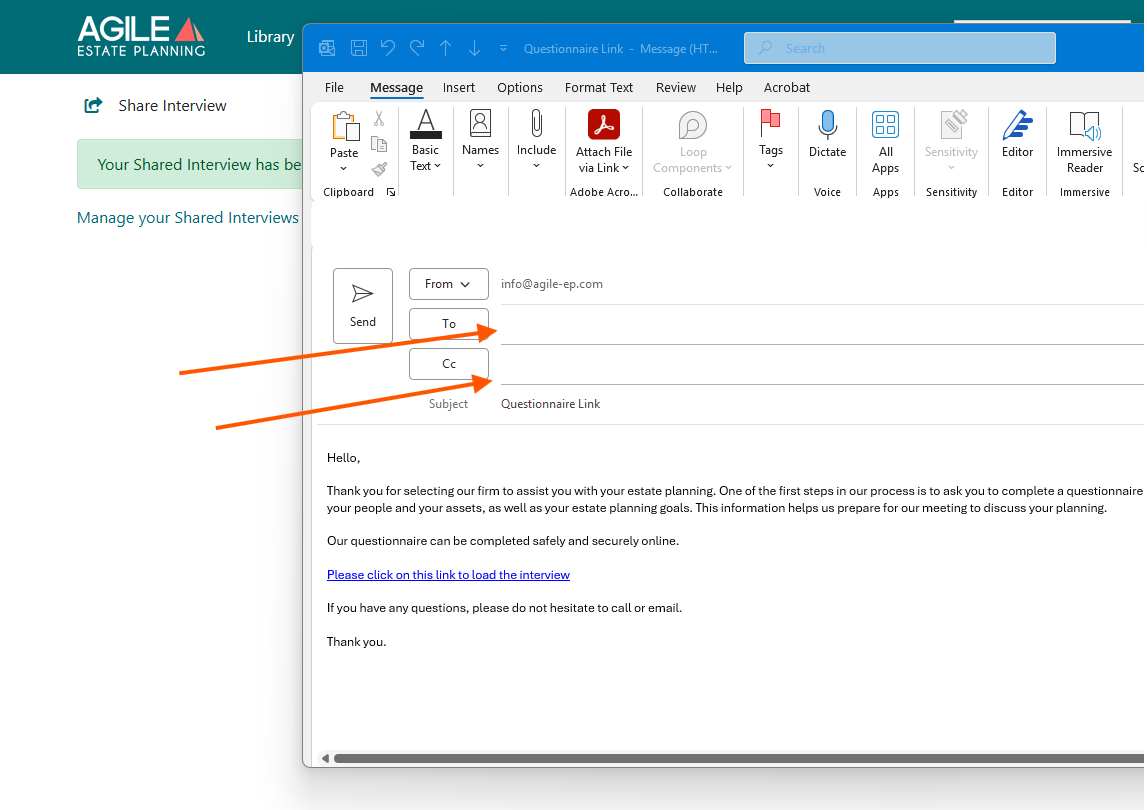
- The sender can add another email address when sending the questionnaire via Outlook and manually adding another recipient to the email.
- The client can forward the original email to another person.
In either case, the link provides access to the same interview.
Example of sending via Outlook:
Important: Responses Can Be Overwritten
The questionnaire does not create separate versions for each person who accesses the link.
If multiple people use the same link:
- They can complete unanswered sections.
- They can revise existing answers.
- Any saved changes will overwrite the previous responses.
There is only one active response file tied to that link. If someone edits a previously completed section and saves the changes, the original answers will be replaced.
Best Practice for Collaboration
If more than one person will be contributing:
- Coordinate before making edits.
- Review existing answers carefully before changing them.
- Use the Save feature frequently.
- You may want to save an “Invitation Email” template for questionnaires that you know will be sent to two people. Then you can include instructions for them to not overwrite each other’s answers.
If you need to preserve a prior version of responses, you can resend a new questionnaire link.