

If you click Assemble in a drafting interview and are redirected back to the interview screen, the system has identified one or more required fields that have not been completed. This is expected behavior.
The system will not assemble documents until all required questions are answered.
What You Will See
When this happens:
- You are returned to the interview screen.
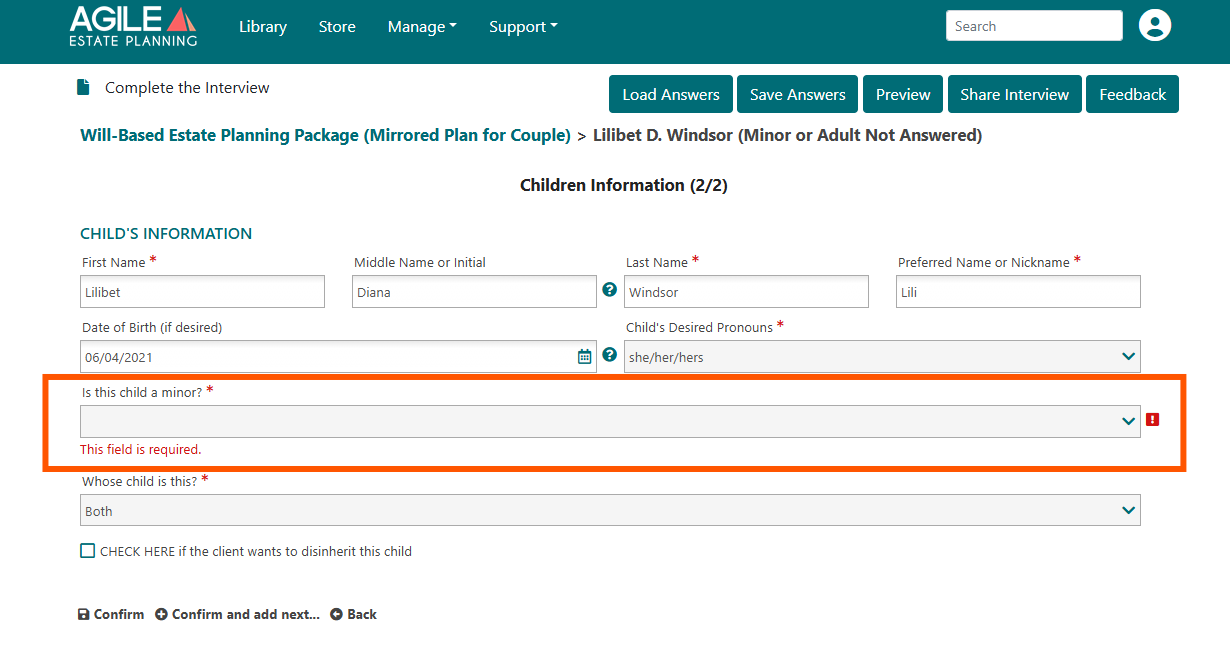
The unanswered required field will display:
- A red message such as “This field is required.”
- A red icon indicator.
- The incomplete question will typically be highlighted.
For example:
In the screenshot below, the question “Is this child a minor?” is required but unanswered, preventing assembly.
(Example shown: required dropdown field displaying “This field is required.”)
What To Do
- Review the screen for red error messages.
- Complete all required fields (marked with an asterisk *).
- Click Save Answers (recommended).
- Click Assemble again.
Once all required questions are answered, the documents will generate normally.
Note: Your answers were not lost. The system is ensuring all required information is completed before generating documents. You do not need to restart the interview; simply complete the missing required fields and click Assemble again.
If Assembly Still Fails
If you have answered all required fields and are still redirected:
- Scroll through the entire interview to ensure no required fields were missed.
- Confirm dropdown fields have an actual selection (some may appear filled but are not selected).
- Save and refresh your browser.
- Log out and back in if needed.
If the issue persists, contact support and include:
- Template package name
- Matter name
- Screenshot of the error
- Browser type