

The Guardian ad Litem (“GAL”) tab allows you to evaluate whether a Probate Guardian ad Litem may be required in the probate proceeding, determine whether waiver of GAL appointment may apply, and prepare any related GAL pleadings within the probate workflow.
Unlike some conditional interview tabs, the GAL tab is always available within the probate interview. Agile Estate Planning automatically evaluates the parties and interests entered throughout the matter and adjusts the GAL workflow based on the information provided elsewhere in the interview.
For a broader discussion of when Washington law requires appointment of a Probate GAL and when waiver may apply, see this article.
Guardian ad Litem Tab - Dynamic States
The Guardian ad Litem tab evaluates the information entered in the tabs above it in the probate interview, particularly the Decedent's Spouse (if any), Children and Grandchildren, Other Parties, and Assign Roles to Parties tabs. Using the party information and probate roles entered in those sections, the software evaluates whether the matter includes a minor, an alleged incapacitated adult, or another protected beneficiary whose interests may require Probate GAL representation during the proceeding.
Depending on the parties entered and the interests identified in the probate proceeding, the GAL tab will generally appear in one of three states:
- No Probate GAL required,
- Probate GAL required, or
- Waiver of Probate GAL appointment may apply.
Each state changes the drafting workflow and the options available within the tab.
When No Probate GAL Needed
When the system does not identify a potentially unrepresented protected party, the GAL tab will display a system assessment indicating that no Probate GAL is currently required. In that situation, the system has not identified a minor or alleged incapacitated person without an acting representative or other fiduciary relationship sufficient to protect the person’s interests within the probate proceeding.
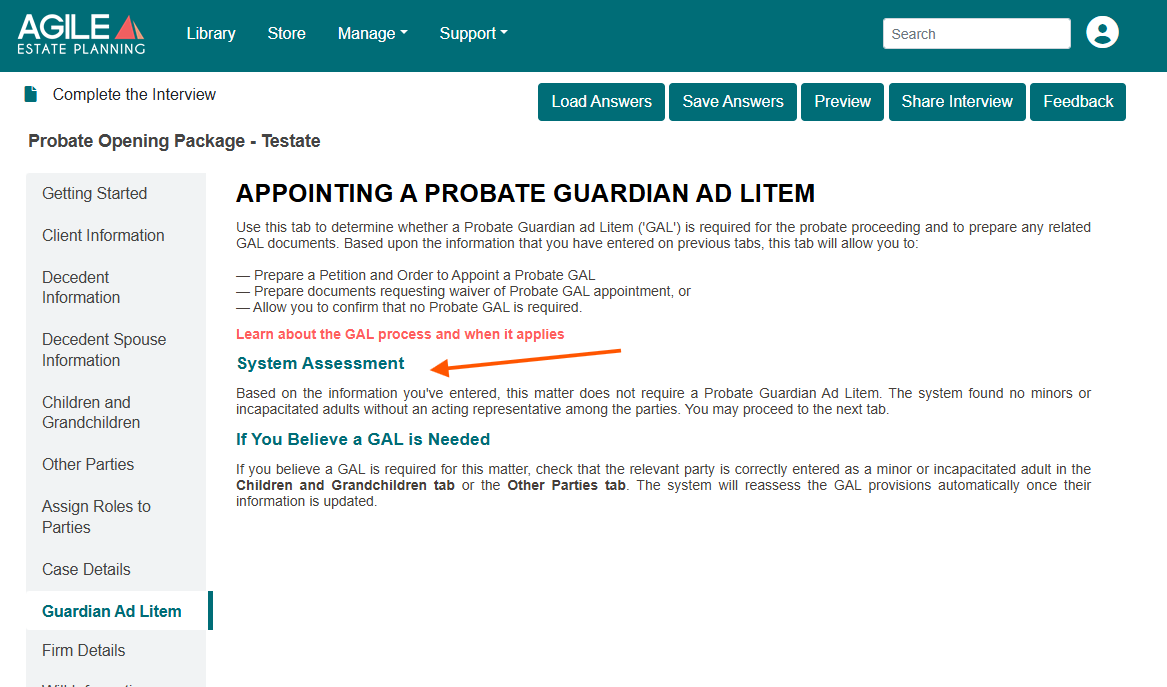
Note: If you believe a GAL should still be required, review the information entered in the Decedent's Spouse (if any), Children and Grandchildren, Other Parties, and Assign Roles to Parties tabs. The GAL workflow continuously reevaluates the probate parties and their interests as information is updated elsewhere in the interview.
When a Probate GAL Is Required
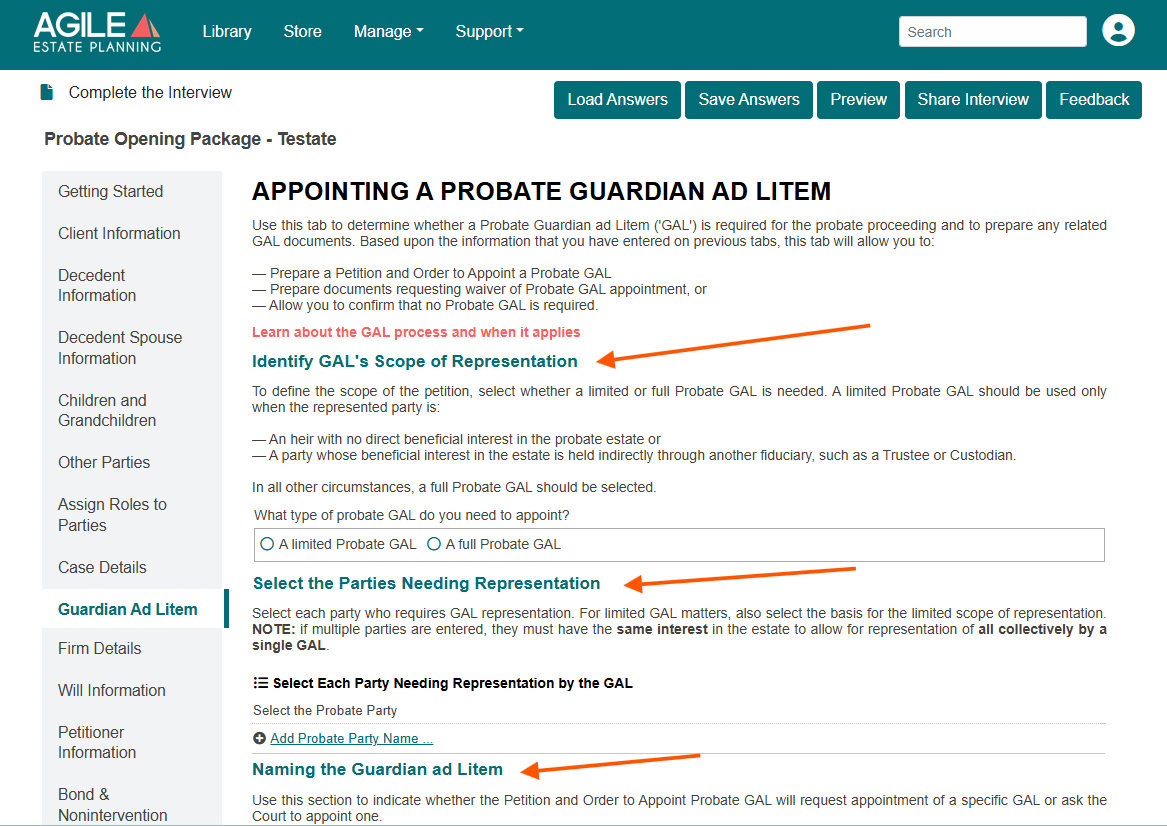
When the system identifies a potentially unrepresented minor, alleged incapacitated person, or protected beneficiary whose interests may require representation in the probate proceeding, the GAL workflow expands automatically and additional drafting options become available.
In this state, the tab allows you to:
- Determine whether a Full or Limited Probate GAL is appropriate,
- Identify the parties requiring representation,
- Select the basis for limited representation where applicable,
- Request appointment of a specific GAL, or
- Request that the court appoint the GAL.
The software will add the necessary documents to complete the GAL appointment process to the Document Selection tab.
When Waiver of Probate GAL Appointment Applies
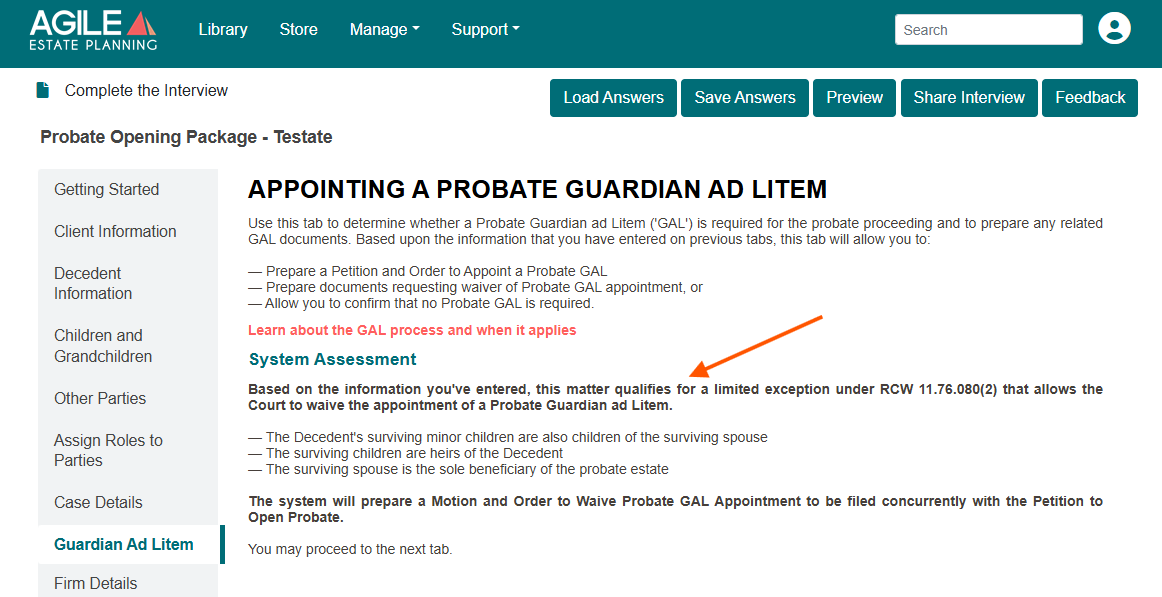
This tab state appears only when the facts entered in the probate interview match the statutory exception under RCW 11.76.080(2) for surviving spouse and minor children of common parentage.
Specifically, the waiver workflow appears when the system identifies that the decedent’s surviving minor children are also children of the surviving spouse, that the surviving spouse is the sole beneficiary of the probate estate, and that the children’s only incapacity is minority.
When those facts are present, the GAL tab will state that the matter qualifies for the limited statutory exception and will prepare a Motion and Order Waiving Probate GAL Appointment to be filed concurrently with the probate opening pleadings.
Appointing a Probate GAL
When a Probate GAL must be appointed, the Guardian ad Litem tab expands to collect the information needed to prepare the appointment pleadings and update the probate opening package. In this state, the tab walks through three core decisions: the scope of the GAL’s representation, the party or parties requiring representation, and whether the petition will request appointment of a specific GAL or ask the court to appoint one.
Identify the GAL’s Scope of Representation
The first step is selecting whether the matter requires a Limited Probate GAL or a Full Probate GAL.
A Limited Probate GAL should be selected only when the represented person is an heir with no direct beneficial interest in the probate estate, or when the person’s beneficial interest is held indirectly through another fiduciary, such as a Trustee or Custodian.
In all other circumstances, select a Full Probate GAL.
Select the Parties Needing Representation
Next, select each probate party who requires GAL representation. If the matter involves a Limited Probate GAL, also identify the basis for the limited scope of representation from the drop down menu.
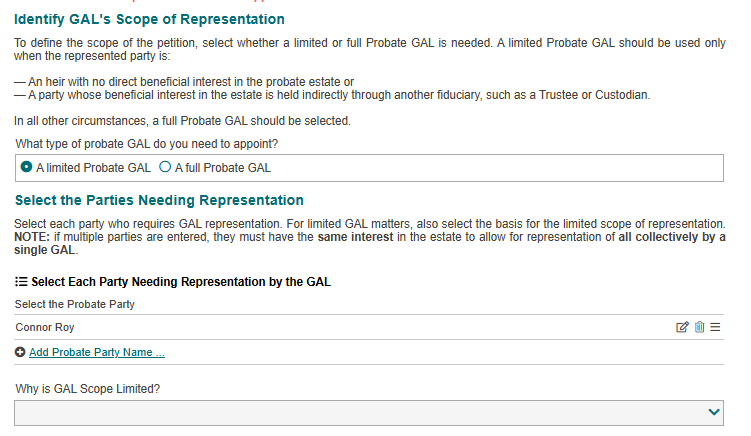
If more than one party requires representation, those parties must have the same interest in the estate. Agile EP currently supports appointment of only one Probate GAL per probate matter. Accordingly, the system assumes that all represented parties may be represented collectively by a single GAL only where their interests are aligned and no conflict exists between them.
The generated Petition and Order Appointing Probate GAL will identify each represented party and will state that the single GAL may represent those parties so long as their interests remain aligned and do not become adverse during the probate proceeding.
Naming the Guardian ad Litem
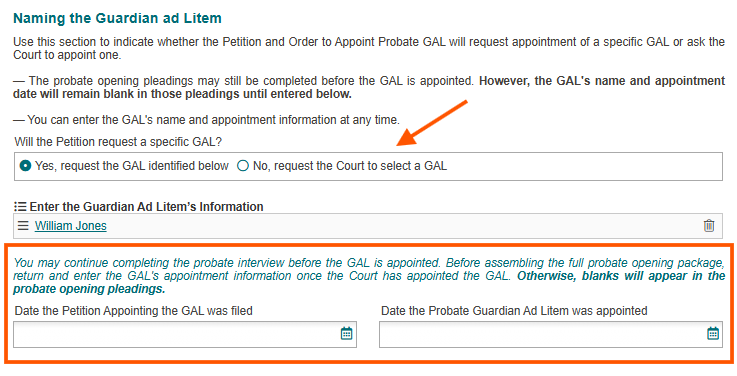
After selecting the party or parties needing representation, indicate whether the Petition and Order will request appointment of a specific GAL or ask the court to appoint one. Agile EP supports both workflows because Washington county practices differ. Some courts allow the petitioner to request appointment of a specific GAL, while other courts require the court to select the GAL, often from a registry or approved list.
If You Request a Specific GAL
Select “Yes, request the GAL identified below” when you intend to ask the court to appoint a specific person as Probate GAL.
The tab will allow you to enter the proposed GAL’s name and information immediately. Once that information is entered, the software can continue drafting the probate opening pleadings using the proposed GAL information, even if the GAL has not yet been formally appointed by the court.
In this workflow, the GAL’s name and representative information will appear throughout the probate opening pleadings and notices. However, if the date the Petition Appointing the GAL was filed and the date the Probate Guardian ad Litem was appointed have not yet been entered, blanks will still appear in portions of the pleadings referencing the appointment hearing or appointment date.
This allows you to complete the probate interview and assemble substantially complete probate opening pleadings before the GAL appointment occurs. Alternatively, after the court appoints the GAL, you may return to the Guardian ad Litem tab, enter the appointment-related dates, and then assemble a final probate opening package without blanks.
If the Court Will Select the GAL
Select “No, request the Court to select a GAL” when the court will appoint the GAL without the petitioner naming a specific person.
In this workflow, Agile Estate Planning prepares the Petition and Order Appointing Probate GAL without identifying the GAL by name. Because the GAL has not yet been selected, probate opening pleadings assembled before the appointment occurs will contain blanks anywhere the GAL’s name, contact information, or appointment information would otherwise appear.
For that reason, the recommended workflow in this scenario is:
- Complete the probate interview and all other probate opening information.
- Assemble and file the Petition and Order Appointing Probate GAL.
- After the court appoints the GAL, return to the Guardian ad Litem tab and enter:
- Assemble the final probate opening package after the GAL information has been completed.
- The GAL’s name and information,
- The date the Petition Appointing the GAL was filed, and
- The date the Probate Guardian ad Litem was appointed.
Following this workflow allows the final probate opening pleadings to assemble without blanks and ensures that the GAL’s information appears consistently throughout the opening probate package and later packages as well.
Document Selection Workflow
The Document Selection tab automatically adjusts based on the GAL workflow selected within the Guardian ad Litem tab. When a Probate GAL appointment or waiver proceeding is required, Agile Estate Planning will add the necessary GAL appointment or waiver pleadings to the available document list. This allows the GAL-related pleadings to be assembled and filed before completing the remainder of the probate opening package if necessary.
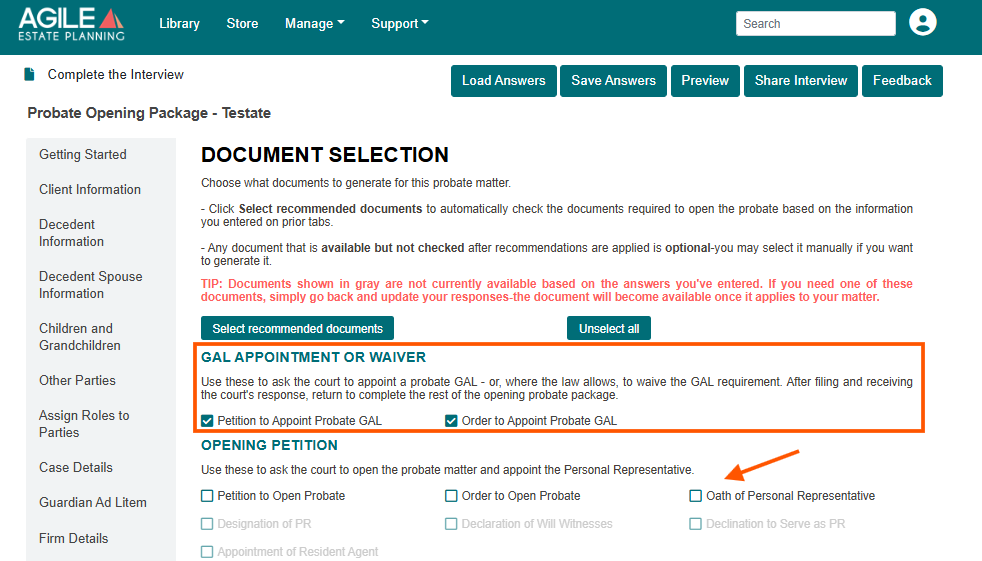
In matters requiring appointment of a Probate GAL, the Document Selection tab will generally make available:
- the Petition to Appoint Probate GAL, and
- the Order to Appoint Probate GAL.
If the matter instead qualifies for the limited statutory waiver under RCW 11.76.080(2), the system will instead prepare:
- the Motion to Waive Probate GAL Appointment, and
- the proposed Order Waiving Probate GAL Appointment.
The probate opening pleadings remain separately selectable within the Document Selection tab. This allows you either to assemble only the GAL appointment or waiver pleadings first, or to manually select and assemble the probate opening pleadings at the same time.