

The Document Selection tab establishes the foundation for the entire drafting package. Your selections on this tab determine which documents will be generated and which downstream interview tabs will appear as you move through the drafting package.
Purpose of the "Document Selection"Tab
This tab serves two core functions:
Document Control
You explicitly choose which estate planning documents are included in the package for this client or clients.Interview Customization
Based on your selections, the system dynamically expands or suppresses later tabs so that you are only asked questions relevant to the documents you intend to draft.
This approach ensures efficiency and avoids unnecessary data entry.
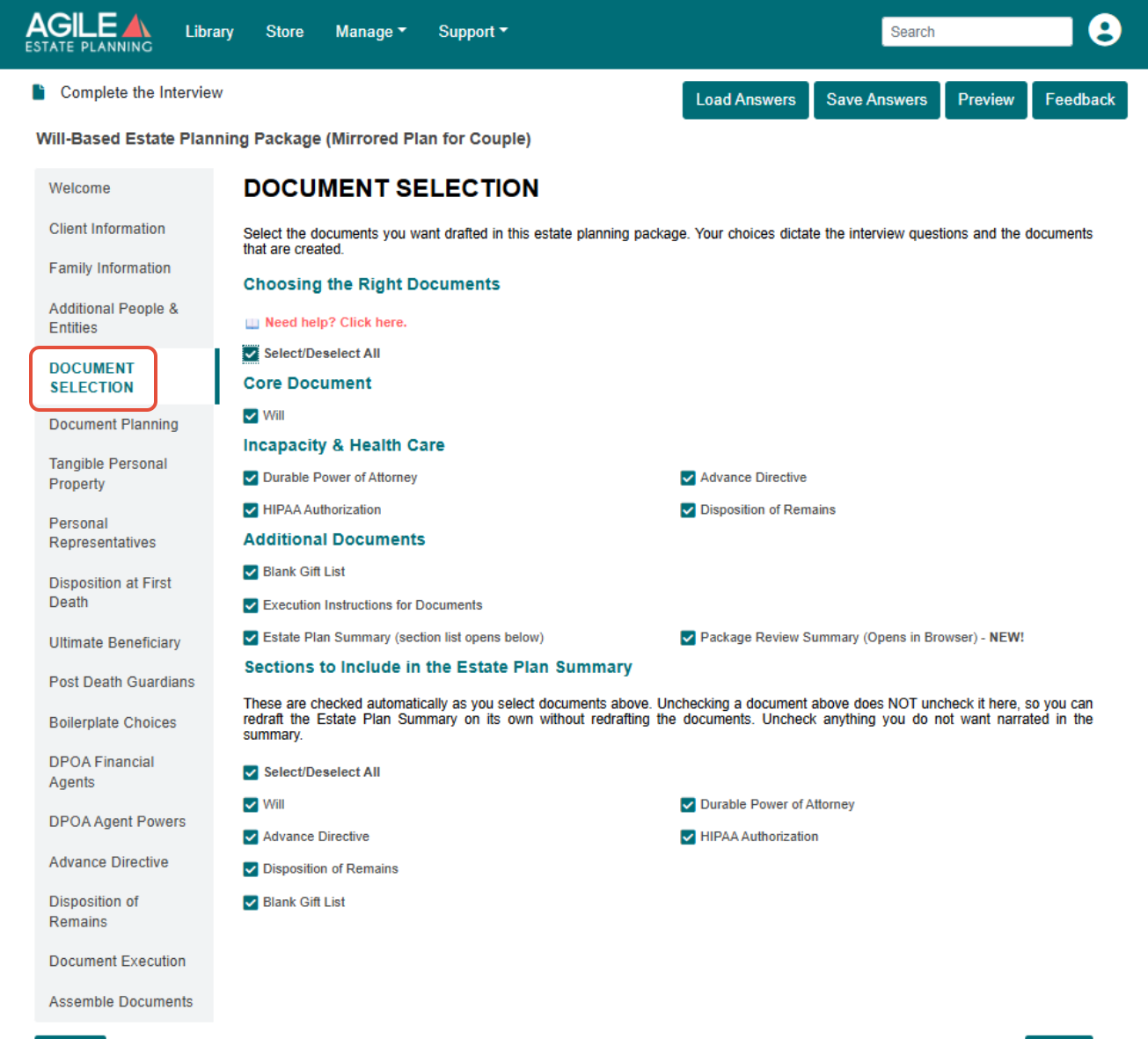
Selecting Documents to Draft
On the main portion of the page, the documents available for the selected Oregon estate planning package are arranged in two columns, grouped by document type so related documents sit together. In a Will-based package, for example, the groups are Core Document, Incapacity & Health Care, and Additional Documents; trust-based packages show the groups relevant to those plans. Only the documents used in Oregon are shown.
Check the documents you want to draft, or use Select/Deselect All to include or exclude the full set at once. There is no required minimum, and any combination of documents may be drafted.
Under Additional Documents you will also find Estate Plan Summary, which opens the summary section described below, and Package Review Summary, a review of the package that opens in your browser.
How Document Selection Affects Later Tabs
Once you move past this page:
Tabs related to unselected documents will not appear.
Tabs tied to selected documents will expand to gather the required information.
The interview flow remains consistent, but only relevant questions are presented.
Estate Plan Summary Options
If you select Estate Plan Summary, a Sections to Include in the Estate Plan Summary list opens below the document list. The documents you select above are checked here automatically. Unchecking a document above does not uncheck it here, so you can redraft the Estate Plan Summary on its own without redrafting the documents. Uncheck anything you do not want narrated in the summary, or use Select/Deselect All in that section.
Important note:
This list affects only the narrative summary, not which documents are drafted.