

The Family Information tab captures the client’s family structure so the document package can accurately reflect the client’s circumstances and intent.
This section appears whether there is one client or two, and regardless of the drafting package selected. The information collected here serves as a foundational data set used throughout the system. In many matters, this section may already be populated from the client questionnaire. Even when pre-filled, it should be reviewed carefully with the client before documents are finalized.
Information entered here drives descendant definitions, contingent distribution schemes, guardianship provisions, and certain default provisions across the document package. Listing a family member does not create a gift. Dispositive decisions are made later in the drafting process. This tab establishes structure, not final allocation.
Why Family Information Matters
Family data serves two core purposes:
- First, it provides the factual foundation necessary to draft accurate class definitions such as “my children,” “my descendants,” or similar family-based designations that may appear in wills, trusts, powers of appointment, and other instruments.
- Second, it allows the attorney to evaluate statutory considerations and default distribution schemes that may become relevant in contingent scenarios.
The objective at this stage is completeness and clarity. Final distribution decisions are addressed later.
Living Children
Below is the screen used to enter information for a living child:
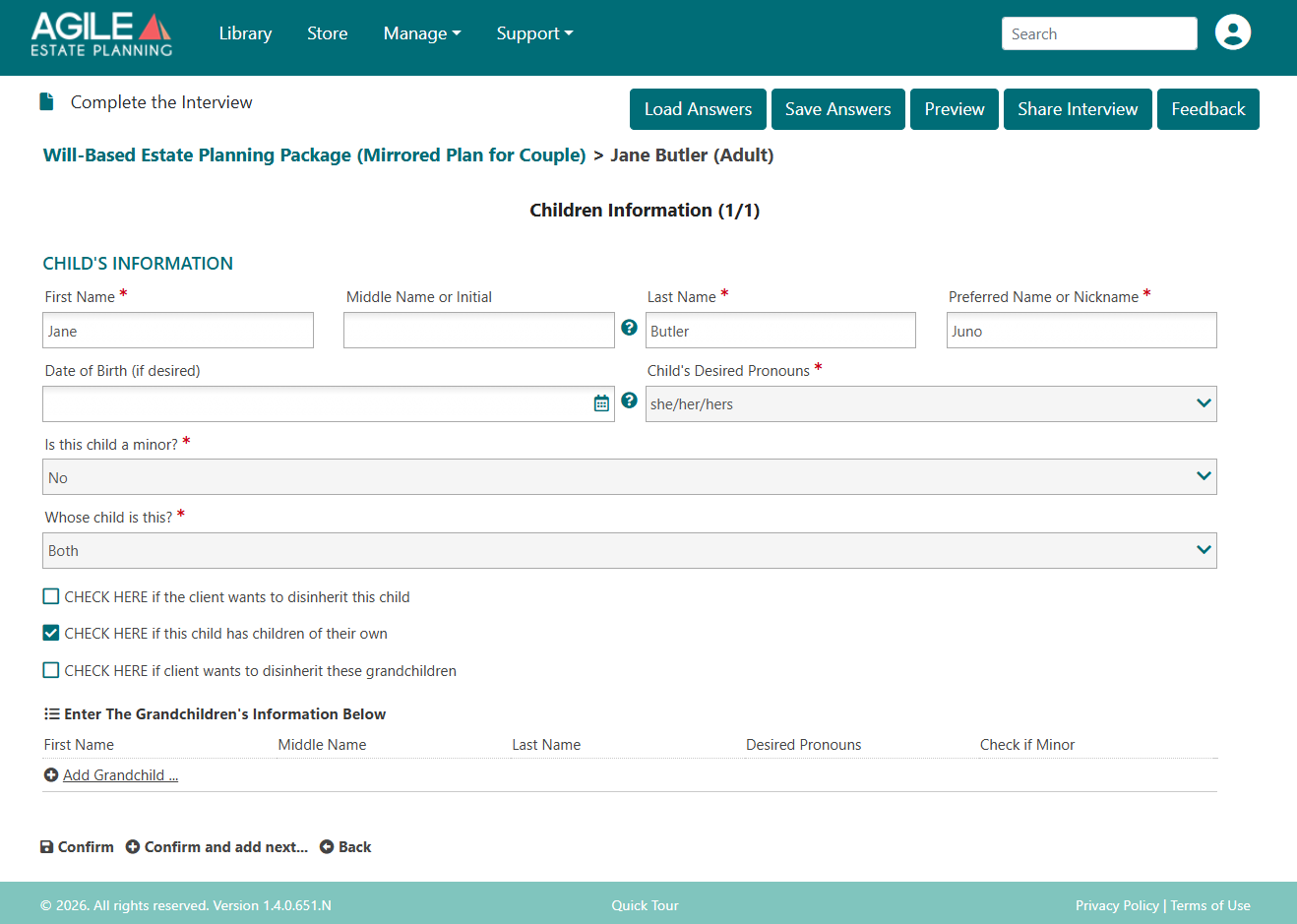
Each living child should be entered individually. When adding a child, the system requests identifying information such as legal name, preferred name, date of birth, pronouns, minor status, and—where applicable—parentage.
Parentage (“Whose child is this?”)
This question appears in multi-client matters and in any drafting package involving more than one client. It does not appear in single-client plans.
Accurate selection is especially important in blended-family situations. The parentage designation determines whether a child is treated as:
A joint child of both clients, or
The child of only one client
This structural classification affects survivorship flow and branch representation throughout the documents. Stepchildren are not automatically treated as joint children in most drafting scenarios.
For example, if any child is identified as the child of only one client, the system will present an option in the Document Planning tab asking whether stepchildren should be included within the definition of “my children” in the package.
If parentage is entered incorrectly, the subsequent stepchild inclusion question may not be triggered appropriately, or may operate in a way that does not reflect the client’s intent.
Date of Birth
Entering a date of birth for any child is optional. If entered, it will appear in the family recitation paragraph. If the client prefers not to include birthdates in the documents, the field may be left blank. The entry does not otherwise control distribution mechanics.
Minor Status
Minor status must be selected for each child because marking a child as a minor triggerrs our system to include provision specific to minors, like guardianship nominations, medical care choices, and testamentary trust provisions related to minors and their guardians.
Children With Their Own Descendants
There is always an option to indicate whether a child has children of their own. If a child has descendants, those descendants should be entered individually. Doing so serves two important functions:
It preserves accurate branch representation and per stirpes drafting
It adds those individuals to the system pick list for potential fiduciary or beneficiary selections later in the interview
Entering grandchildren ensures they are available for selection in the distribution, trust, or fiduciary sections of the drafting interview if needed.
Even if no immediate planning decision involves that branch, entering descendants maintains structural accuracy and drafting flexibility in contingent scenarios.
Deceased Children
The interview asks whether either client has deceased children. If a deceased child has surviving descendants, those descendants may be relevant to class-based drafting, representation provisions, or default distribution schemes depending on how the documents are structured.
Entering a deceased child ensures the family structure is accurately reflected and allows representation provisions to function correctly if needed. Including a deceased child does not determine whether that branch will inherit. It preserves structural accuracy so that distribution decisions can later be implemented as intended.
Disinheritance
If a client intends to disinherit a child or a branch of descendants, this is the section where that election must be made. Failure to make the appropriate selection here will result in the child (or branch) remaining eligible under applicable class-based or contingent provisions.
Each child should still be entered in the Family Information tab, even if the client does not intend for that child to receive assets. Entering the child establishes the factual family structure. The disinheritance selection then controls whether exclusion language is included in the documents.
The system permits separate elections to disinherit:
The child only, or
The child and that child’s descendants
These are distinct drafting choices and must be selected affirmatively.
If the client’s intent is to disinherit an entire branch, the child’s descendants must also be entered so that branch-level treatment can be clearly specified.
Parents and Siblings
This section of the Family Information tab allows entry of immediate family members such as parents and siblings.
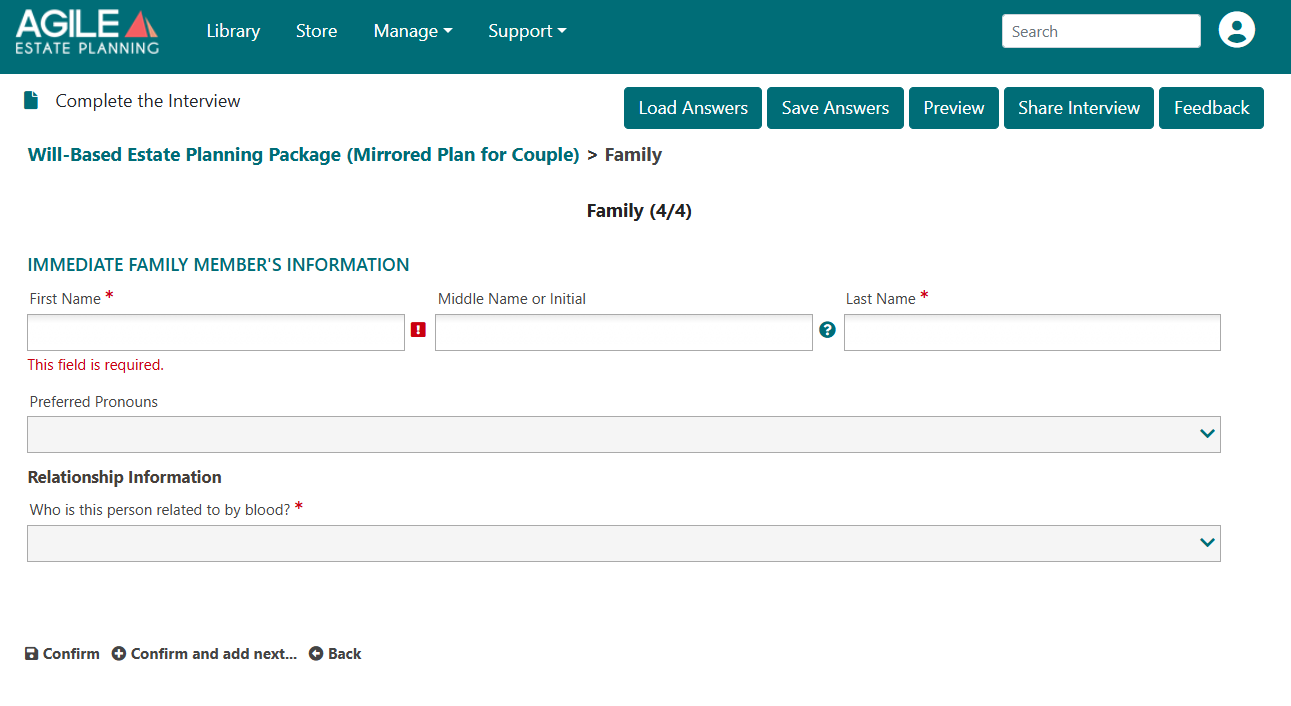
Each person entered must be assigned a relationship designation (“Who is this person related to by blood?”). This selection directly affects how the individual is referenced in the documents.
The system uses the relationship designation to generate relational language. For example, if a sister of Client 1 is entered:
The documents for Client 1 may refer to her as “my sister”
The corresponding documents for Client 2 may refer to her as “my sister-in-law”
Accurate relationship classification ensures that relational references and contingent language align correctly for each client.
Entering parents or siblings also adds them to the system pick list for potential fiduciary or beneficiary selection and supports contingent drafting where no spouse or descendants survive.