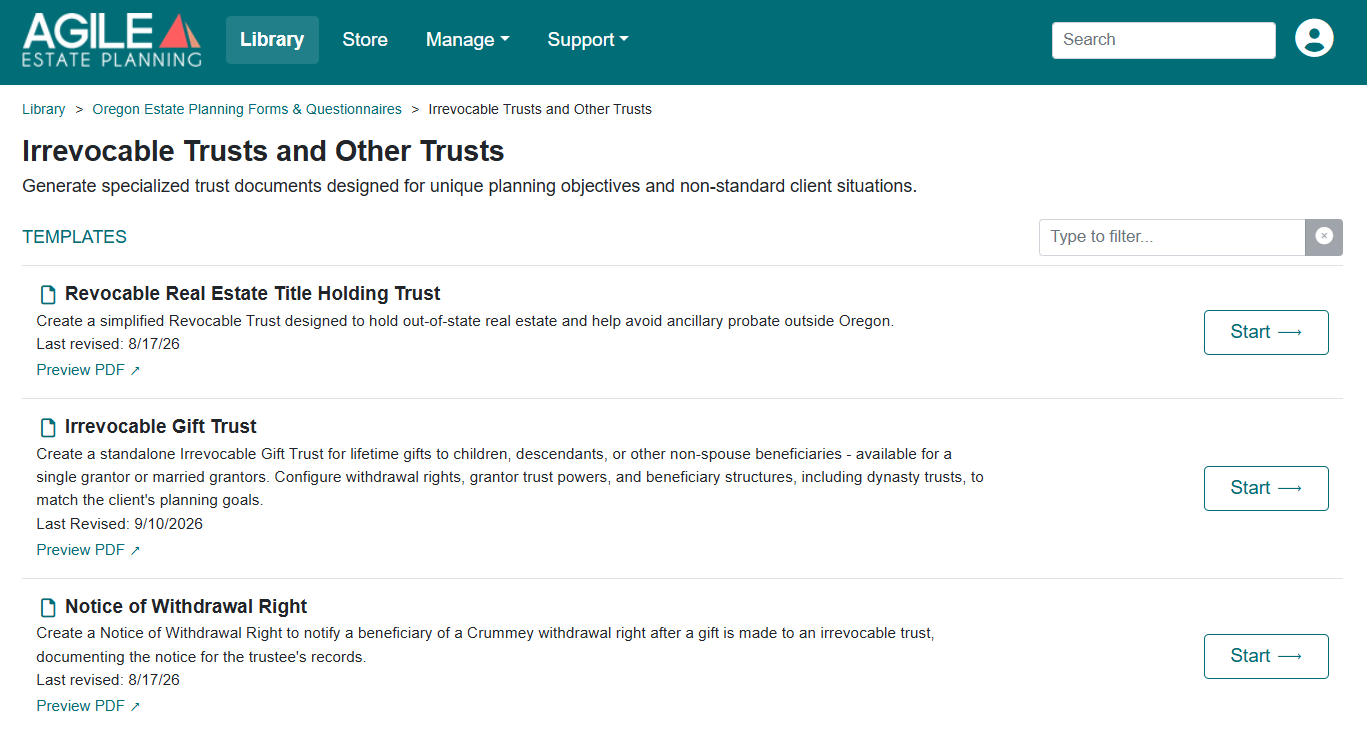

The Irrevocable Gift Trust is a standalone trust for lifetime gifts to children, descendants, or other non-spouse beneficiaries. It allows the grantor to move property outside the grantor’s taxable estate while establishing the terms on which beneficiaries may use or receive that property.
The trust can be created by one Settlor or by two Settlors creating a single joint trust. A two-Settlor trust is available when the client is married; the client and spouse create the trust together as co-grantors.
Unlike the Will and Revocable Trust packages, which assemble a coordinated set of estate planning documents, the Gift Trust interview is centered on the design of one irrevocable trust. You will move from the basic trust structure to the beneficiary plan, trustee appointments, tax provisions, and administrative choices that will govern the trust over time.
Because the trust is irrevocable, the design choices made in the interview matter. The goal is not simply to complete each screen, but to make sure the finished trust reflects the intended gift, the intended beneficiaries, and the way the trust should operate after it is funded.
This is the Gift Trust, not a SLAT or an ILIT.
The Gift Trust does not name the grantor’s spouse as a beneficiary. A trust designed to benefit the Settlor’s spouse during life is a Spousal Lifetime Access Trust (SLAT). A trust designed to hold life insurance is an Irrevocable Life Insurance Trust (ILIT).

Those are separate Agile EP products with their own drafting structures. Select the appropriate product from the Library before beginning. The Gift Trust interview does not include a separate on-screen question asking you to choose among these trust types.
Locate the Gift Trust Template
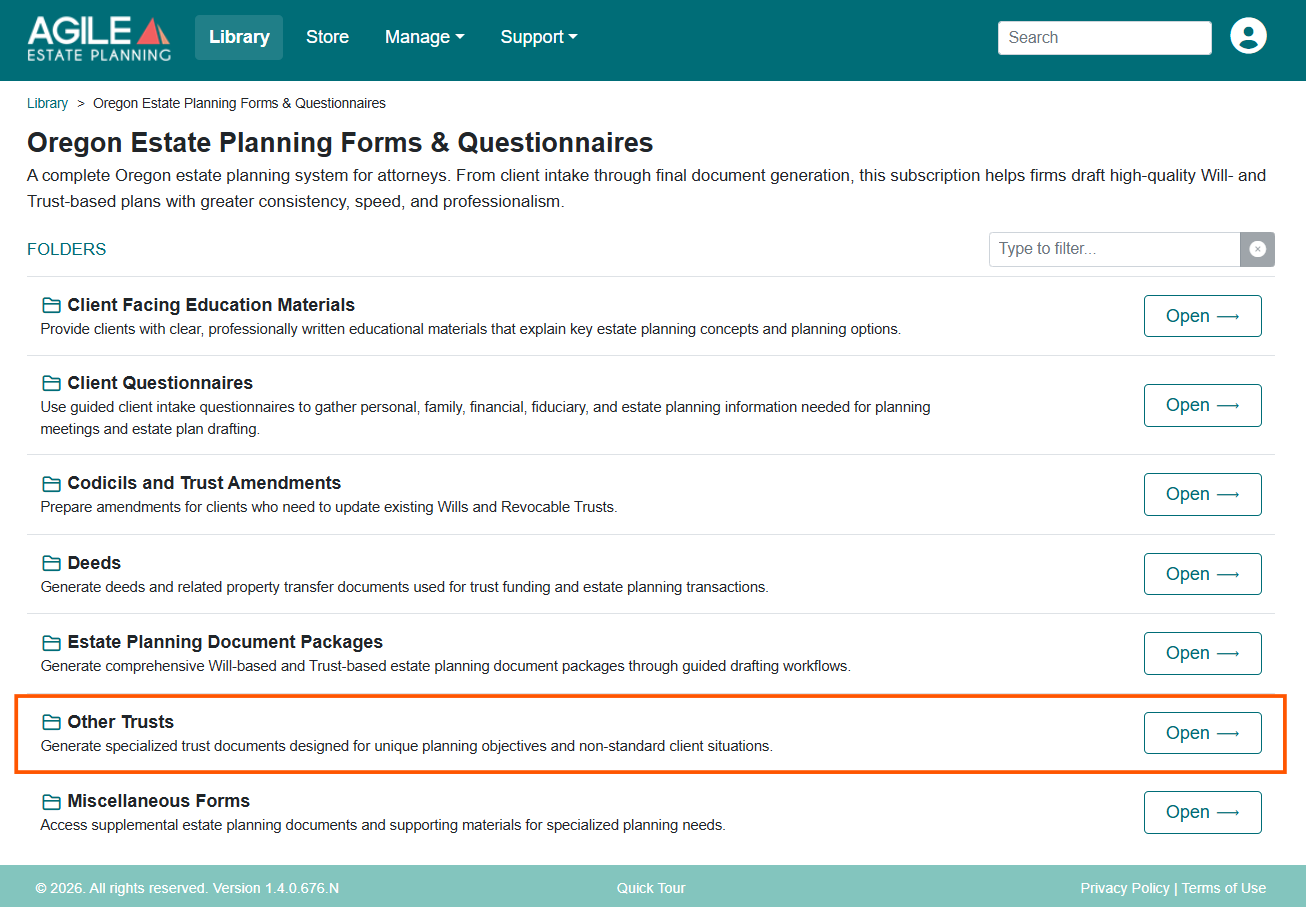
Begin in the Library. Open the Oregon Estate Planning Forms & Questionnaires product, open the Irrevocable Trusts and Other Trusts folder and open the Irrevocable Gift Trust template to access the drafting interview.
Using Existing Client Answers
If you previously saved the interview, select Load Answers and open the applicable answer file. The saved answers will repopulate the interview so you can continue drafting or revise the trust without re-entering the client information.
The interview tabs appear in the navigation menu on the left. As you work through them, each tab builds on information entered earlier. Completing the interview in sequence makes it easier to see the available options in context and reduces the chance of overlooking a question that depends on an earlier selection.
Client, Family & Additional People and Entities Tabs
The opening tabs identify the people and organizations that may appear in the trust. This includes the Settlor or Settlors, family members, trustees, beneficiaries, charities, and anyone who may hold an appointment or removal power.
Start with the grantor information. If the client is married and the trust will have two Settlors, the Client Information tab shows both spouses, labeled Client 1 and Client 2. Enter each grantor’s name, gender, city and state, and citizenship. The state selected here drives the state-specific provisions that appear throughout the trust.
Next, enter the family information the trust may need to reference. This includes children, deceased children, extended family members, and whether stepchildren will be treated as children under the trust.
On the Additional People Tab, add each person or organization you may want to choose later, including:
- Initial and successor trustees
- Current and remainder beneficiaries
- Charitable beneficiaries
Once a person or entity has been entered, that name becomes available in the later dropdowns. It is usually easier to enter everyone the trust may reference before moving into the substantive design questions.
Establish the Trust Design
The Trust Design tab serves two core functions. Several downstream tabs are conditional, meaning they appear only when the corresponding feature has been selected here.
Trust Information
The first section establishes the basic identity of the trust.
- Trust name. Enter the full legal name exactly as it should appear in the trust instrument and related documents.
- Who is creating the trust.
- If the client is married, select the Client as sole Grantor, the Spouse as sole Grantor, or the Client and Spouse as joint Grantors. You can also then select whether the documents should use “my Husband or Wife, my Spouse, or my Partner” at any time in the trust when needed.
- If the client is single, this question does not appear, and the Client is the sole Grantor by default.
Trust Structure
The Trust Structure questions determine which optional provisions the trust will include. The first three questions act as gateways to the more detailed drafting choices on the Trust Features tab.
- Include Crummey withdrawal rights? Adds a temporary right for beneficiaries to withdraw contributions made to the trust, which supports treating those gifts as present-interest gifts for the annual gift tax exclusion.
- Allow the trustee to withhold distributions? Gives the trustee authority to suspend or withhold otherwise-required distributions under specified circumstances.
- Include grantor trust powers? Adds powers that cause the grantor to be treated as the owner of the trust for federal income tax purposes.
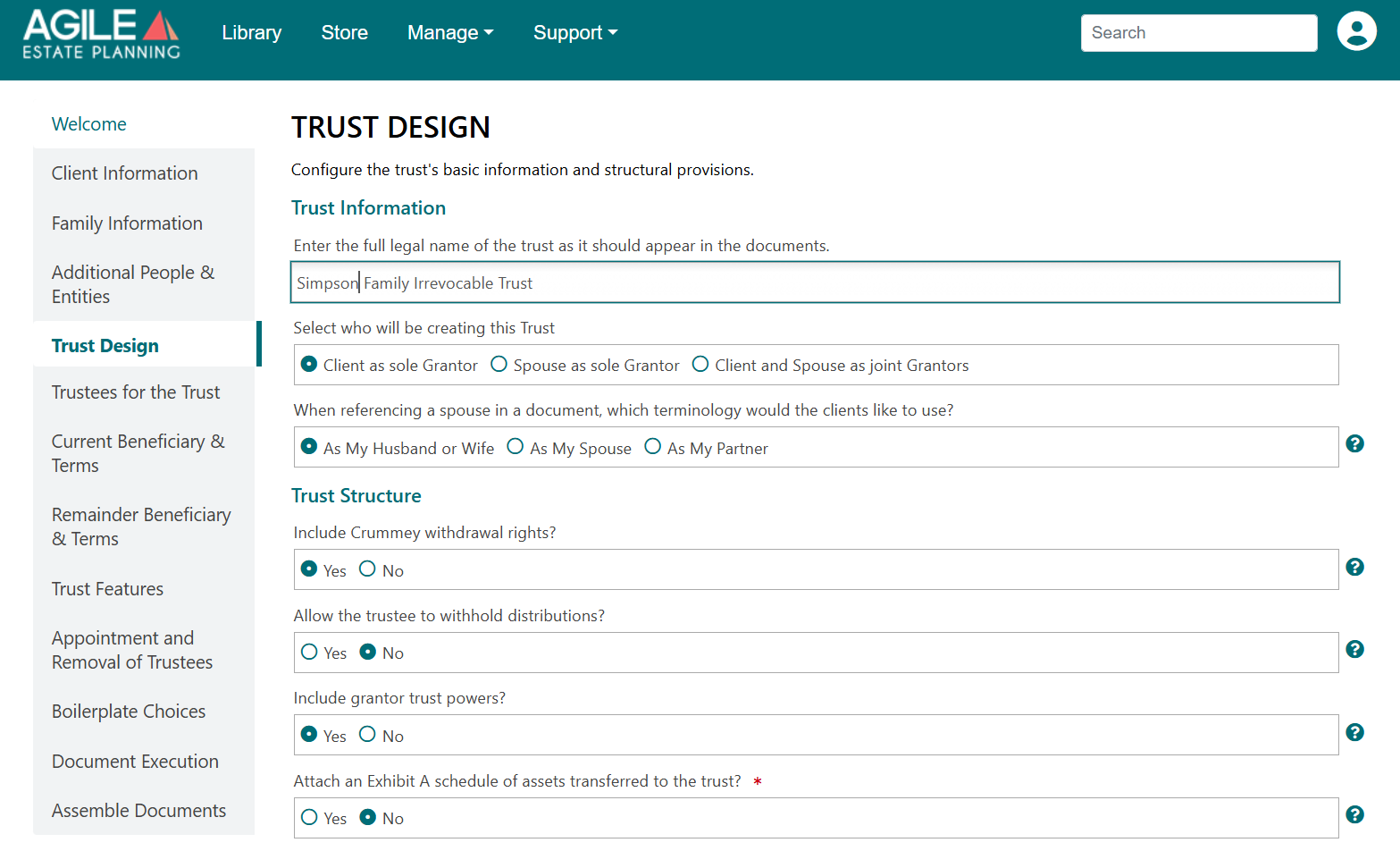
The final structural question on this tab allows you to add an Exhibit A schedule to the trust and gives you an option to add assets descriptions as well. Adding an Exhibit A is not necessary to have a complete trust or effective assignments.
Exhibit A is a record attached to the trust instrument. It is not the document that completes the transfer of property tot he trust. Any assignment, deed, account change, or other transfer document must still be handled separately as appropriate for the asset.
Choose the Current and Remainder Trust Beneficiaries
Once the basic trust structure is in place, the interview turns to the beneficiary plan. The Current Beneficiary & Terms and Remainder Beneficiary & Terms tabs work together to answer three questions:
- Who benefits first?
- How long is that interest held?
- Where does the property pass when that interest ends?
Below is a summary of options; for a fuller discussion of the available beneficiary structures, distribution standards, and GST planning choices, see this article.
Step 1: Choose the Current Beneficiary Structure
On the Current Beneficiary & Terms tab, begin by deciding whether the trust is designed primarily for one named beneficiary or for a group of beneficiaries held together in a common trust.
One named individual
If the trust is being created for one primary beneficiary, choose how the trust will be administered for that beneficiary. You have three basic structures to benefit the current primary beneficiary.
- In trust until certain ages. The trust continues until the beneficiary reaches the distribution ages selected in the interview. You may provide for outright distributions at up to three ages. If the beneficiary dies before receiving the entire trust, the remaining property passes under the remainder provisions.
- In trust for the beneficiary’s lifetime. The property remains in trust throughout the beneficiary’s life. At the beneficiary’s death, the remaining property passes under the remainder provisions.
- In trust for the beneficiary’s lifetime, then continuing in trust for descendants. This is the dynasty structure. At the beneficiary’s death, the remaining property continues in separate lifetime trusts for the beneficiary’s descendants. In this case, the remainder provisions design the ongoing trusts for descendants (each their own primary beneficiary of their own trust).
A group or class held together in a pot trust
If the trust is intended to benefit a group, such as the Settlor’s children or descendants, the property can remain in one pot trust before dividing into separate interests. You can choose how the pot trust is administered and the triggering event for its division.
- Divide at the grantors’ death. The trust is administered as a pot trust while either (or both) of the Settlors are living. At the death of the Settlor (or of the last of the Settlors), the pot trust divides into separate trusts for each member of the class.
- Divide at a set age. The trust is administered as a pot trust without any mention of the lifetimes of the Settlors and instead until the youngest member of the class reaches a selected age. At that time, the pot trust then divides into separate shares for the members of the class.
The Agile EP form specifically does not permit a trust that benefits a class with separate subtrusts immediately. This is a stylistic choice for ease of administration of the trust(s). If you want to create separate trusts for each child of the Grantors (for example), then you must create several gift trusts, one for each child as the sole individual beneficiary.
Note: Separate shares and separate trusts are not the same.
A separate share is an accounting division within the existing trust. Each beneficiary’s portion is tracked separately, but the shares remain part of the same trust and generally use the same taxpayer identification number.

A separate trust is a new trust administered independently, generally under its own governing instrument and EIN.
Step 2: Choose How the Remainder Interests are Administered
On the Remainder Beneficiary & Terms tab, you can identify who receives the property when the current primary beneficiary’s interest in trust ends. The remainder may pass to the primary beneficiary’s descendants, a named individual, a charity, or another defined class. You will also choose how that property is received: outright, through a custodian under UTMA, or in a contingent trust that continues until a selected age.
Step 3: Choose an “Ultimate Beneficiary”
Also on the Remainder Beneficiary & Terms tab, you can choose whether you want an “ultimate beneficiary” named in the trust in case all other named beneficiaries die. You can dictate that in that unlikely event, the trust is distributed outright to a named person, a charity, a class, the Settlors’ heirs-at-law, or through a custom provision that you can design.
Choose the Trustees
The Trustees tab identifies who will administer the trust when it is created and who will serve if the initial trustee can no longer act. You may name one trustee, co-trustees, and one or more levels of successor trustees.
This tab follows the same general fiduciary-selection structure used in the other Agile EP packages, and you will be asked to name Trustees for the Trust and any subtrusts that you create for reminder beneficiaries.
Note: If the trust includes grantor trust powers, the document also uses a separately defined Independent Trustee for specified powers. That role, and the reason it is separated from the acting trustee, is explained in this article.
Complete the Optional Trust Features
The Trust Features tab contains the detailed questions for the optional provisions selected earlier on the Trust Design tab. Only the feature sets you turned on will appear. These sections involve more technical drafting choices than the general trust design questions.
Beneficiary Withdrawal Rights (Crummey Powers)
If the trust includes withdrawal rights, the interview asks you to define how those rights will operate. You will decide:
- Whether each right will equal the full annual exclusion amount or be limited to the 5-and-5 amount
- Whether any excess will lapse in full or remain outstanding as a hanging power
- How many days the beneficiary will have to exercise the right
These choices affect both the beneficiary’s rights and the intended tax treatment of the gift. See this article for a fuller explanation of the withdrawal power alternatives.
Notice of Withdrawal Right.
When a gift is made to the trust, the trustee should notify each beneficiary who receives a withdrawal right. These notices are not generated as part of the Gift Trust assembly.

Prepare each notice using the standalone Notice of Withdrawal Right template in the Irrevocable Trusts and Other Trusts folder of the Library.
Use caution for beneficiaries who receive needs-based public benefits.
A presently exercisable right to withdraw trust property may be treated as an available resource and may affect eligibility for needs-based benefits.

Before giving a withdrawal right to a beneficiary who receives or may receive public benefits, review the planning considerations described in Special Needs Planning.
Grantor Trust Provisions
If grantor trust provisions are enabled, the interview allows you to select which powers the trust will include. The available options are:
- The Internal Revenue Code § 675(4)(C) power to substitute assets, with an optional carve-out for voting stock
- The § 675(2) power to borrow without adequate security
- An Independent Trustee’s discretionary power to reimburse the grantor for income taxes attributable to the trust
- An Independent Trustee’s power to suspend and later reinstate grantor trust status
The powers can be selected individually, allowing you to tailor the grantor trust provisions to the intended design. See this article for an explanation of what each grantor trust power does and the drafting considerations associated with it.
Review the Boilerplate Choices
After the main trust structure is complete, the Boilerplate Choices tab allows you to tailor the administrative and protective provisions that support the plan.
The available selections address subjects such as trust consolidation and division, situs, trustee modification powers, notice and reporting, no-contest provisions, divorce protection, special-needs planning, GST division, and closely held business interests.
These provisions may not change who receives the trust property, but they can significantly affect how the trust is administered and how it responds to future circumstances. Use the tip icon next to each option to review sample language before deciding whether to include it.
Complete the Execution Details
The Document Format and Execution tab controls the execution blocks and formatting of the assembled documents. Enter the attorney and notary who should appear in the documents, add the witnesses if known, and select the footer and page-numbering preferences.
Assemble and Review the Documents
Once the interview is complete, review the answers and then open the Assemble Documents tab.
- Save the answer file.
- Click Assemble Your Documents.
- Allow Agile EP to generate the trust and related documents.
After assembly, the documents appear on the Assembled Documents screen. Download and review the complete package before execution. If you need to make a change, return to the applicable interview tab, revise the answer, and assemble the documents again. See this article for more on assembling documents, including the warnings that can appear on the Assemble Documents tab.
Related Documents in the “Irrevocable Trusts and Other Trusts” Folder
The Gift Trust interview drafts the trust itself. A related document is drafted separately, from its own template in the Irrevocable Trusts and Other Trusts folder of the Oregon Estate Planning Library:
- Notice of Withdrawal Right. After a gift is made to the trust, this notifies a beneficiary of a Crummey withdrawal right and documents the notice for the trustee’s records. See this article for how withdrawal rights and notice work.