

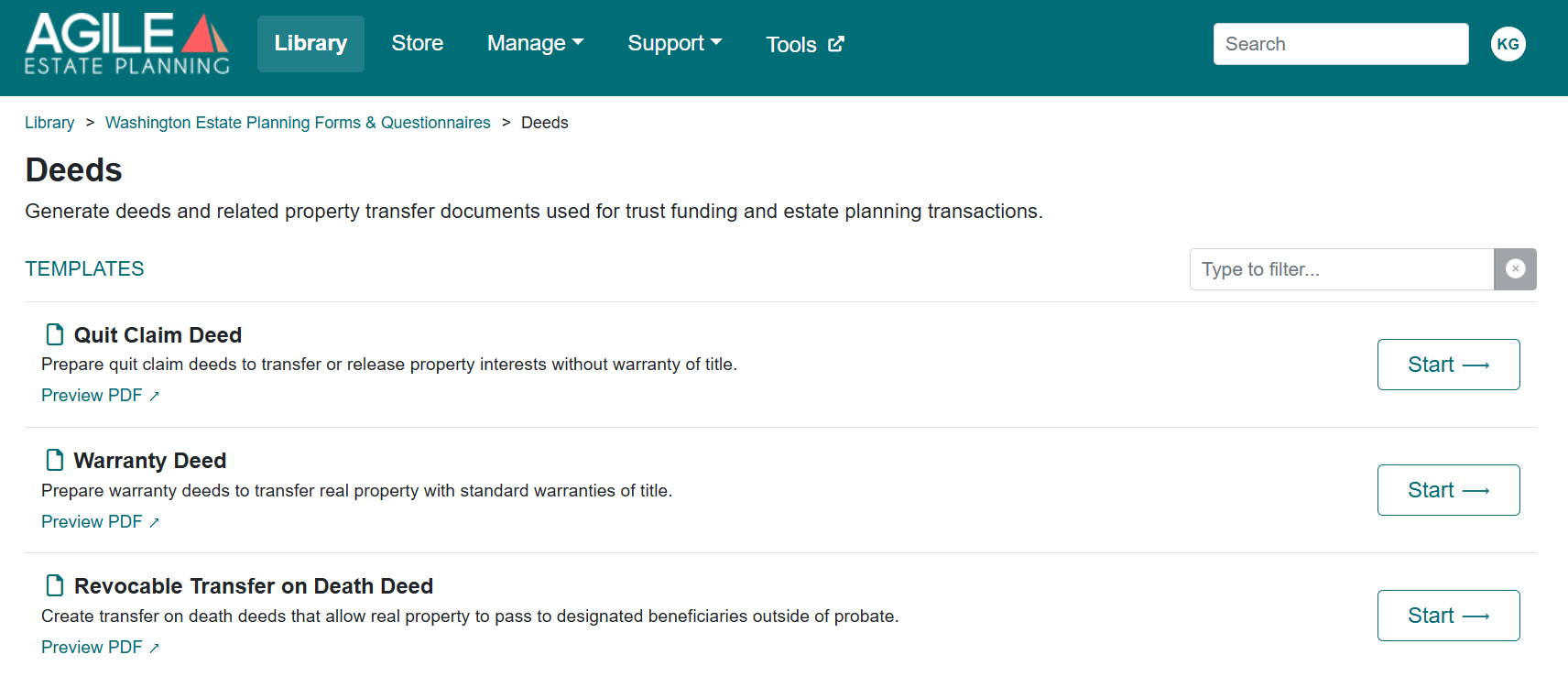
The Deeds folder in the Washington Estate Planning library allows you to prepare a deed on its own, without drafting a full estate planning package. The folder includes three templates: the Quit Claim Deed, the Warranty Deed and the Revocable Transfer on Death Deed.
Real property can also be transferred into a trust as part of a trust-based estate plan. Washington trust packages produce their own Funding Deed for that purpose and can prepare the Real Estate Excise Tax Affidavit (REETA) along with it. For more information about trust packages, see this article.
Templates in the “Deeds” Folder
- Quit Claim Deed: Conveys whatever interest the Grantor holds, without warranty of title.
- Warranty Deed: Conveys the property with the statutory warranties of title. The assembled document is titled Statutory Warranty Deed.
- Revocable Transfer on Death Deed: Names one or more beneficiaries who receive the property when the owner dies. The owner keeps full ownership and can revoke the deed during life.
What These Deeds Generate
When assembled, the Quit Claim Deed and the Warranty Deed include:
- A first page formatted for recording, with the return address, the tax parcel numbers, the abbreviated legal description and a line naming the Grantors and Grantees, as Washington requires on the first page of a recorded document.
- The names of the Grantors and Grantees, followed by the vesting language you select.
- The full legal description, either in the body of the deed or attached as Exhibit A.
- A signature page with a notary acknowledgment for the notary you select.
- If you choose to prepare it, a completed Real Estate Excise Tax Affidavit (REETA), produced as a separate PDF.
- A Real Estate Excise Tax Supplemental Statement, also a separate PDF, when the exemption selected is WAC 458-61A-201 (gifts) or WAC 458-61A-213 (IRS tax deferred exchange).
- A REETA continuation sheet listing the parties when there are more than two Grantors or more than one Grantee.
What You Need Before Starting
Before you open the interview, gather the following information:
- The full legal names of the Grantors and Grantees, and how each will hold title.
- For a trust: the trust’s name, the date of the trust agreement and the trustees’ names.
- For a business entity: its type, its state of formation, and the name and title of the person signing for it.
- The property address and county.
- The tax parcel numbers.
- The abbreviated legal description, and the full legal description from the vesting deed or title report.
- The return address for the recorded deed and, if known, the notary.
- If you will prepare the REETA: the assessed value of each tax parcel, mailing addresses and phone numbers for the Grantors and Grantees, and whether the transfer is exempt from real estate excise tax and under which exemption.
Locate the Template
The deed templates are stored in the Library. To open one:
- From the top navigation, select Library.
- Open Washington Estate Planning Forms & Questionnaires.
- Open the Deeds folder.
- Select Start next to the deed you want.
Before You Begin
If you are continuing work on a previously saved deed, click Load Answers to reopen the saved answer file instead of re-entering the information. Answer files saved before the October 2026 interview changes still load, and your earlier choices carry over. For detailed instructions about using existing answer files, see this article.
Complete the Drafting Interview
The Quit Claim Deed and Warranty Deed interviews are organized into four tabs: Deed Parties, Property, Recording and REETA Information. Each tab is described below. The Revocable Transfer on Death Deed interview has the first three tabs only.
Deed Parties
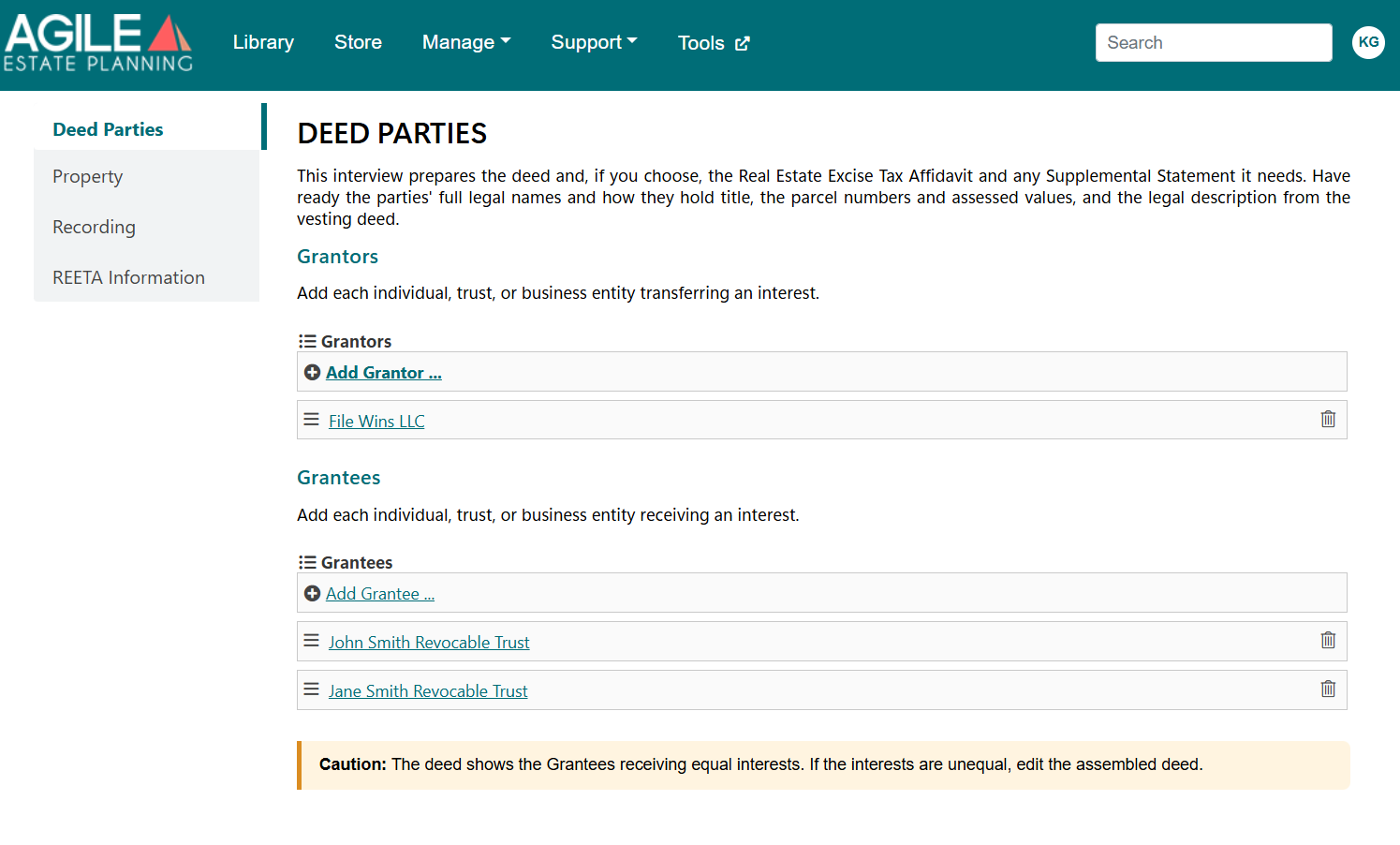
This tab identifies everyone transferring and receiving an interest in the property. It opens with a short note summarizing what the interview prepares and what information to have ready.
Click Add Grantor to add each individual, trust or business entity transferring an interest, and Add Grantee to add each one receiving an interest. For each party, you will indicate whether it is an individual, a trust or a business entity. Depending on your choice, the interview asks for:
- Trust: The trust’s full legal name, the date of the trust agreement and its trustees. The deed prints the party as “[trustee], as Trustee of [trust name] dated [date].”
- Business entity: The entity’s type, its state of formation, and the name and title of the person signing on its behalf.
When entering a trust, type only the trustee’s name in the trustee field and only the trust’s name in the trust name field. The deed adds the rest of the description, so typing the full “as Trustee of…” language into the trustee field prints the trust twice.
Below each list, you will select how the Grantors hold title and how the Grantees will take title, or type your own description. The description prints in the deed immediately after the names. Select none if no description should print.
Unequal interests
With more than one Grantor or Grantee, the deed shows them transferring or receiving equal interests. A yellow Caution bar appears on the tab as a reminder. If the interests are unequal, edit the assembled deed before recording.
Property
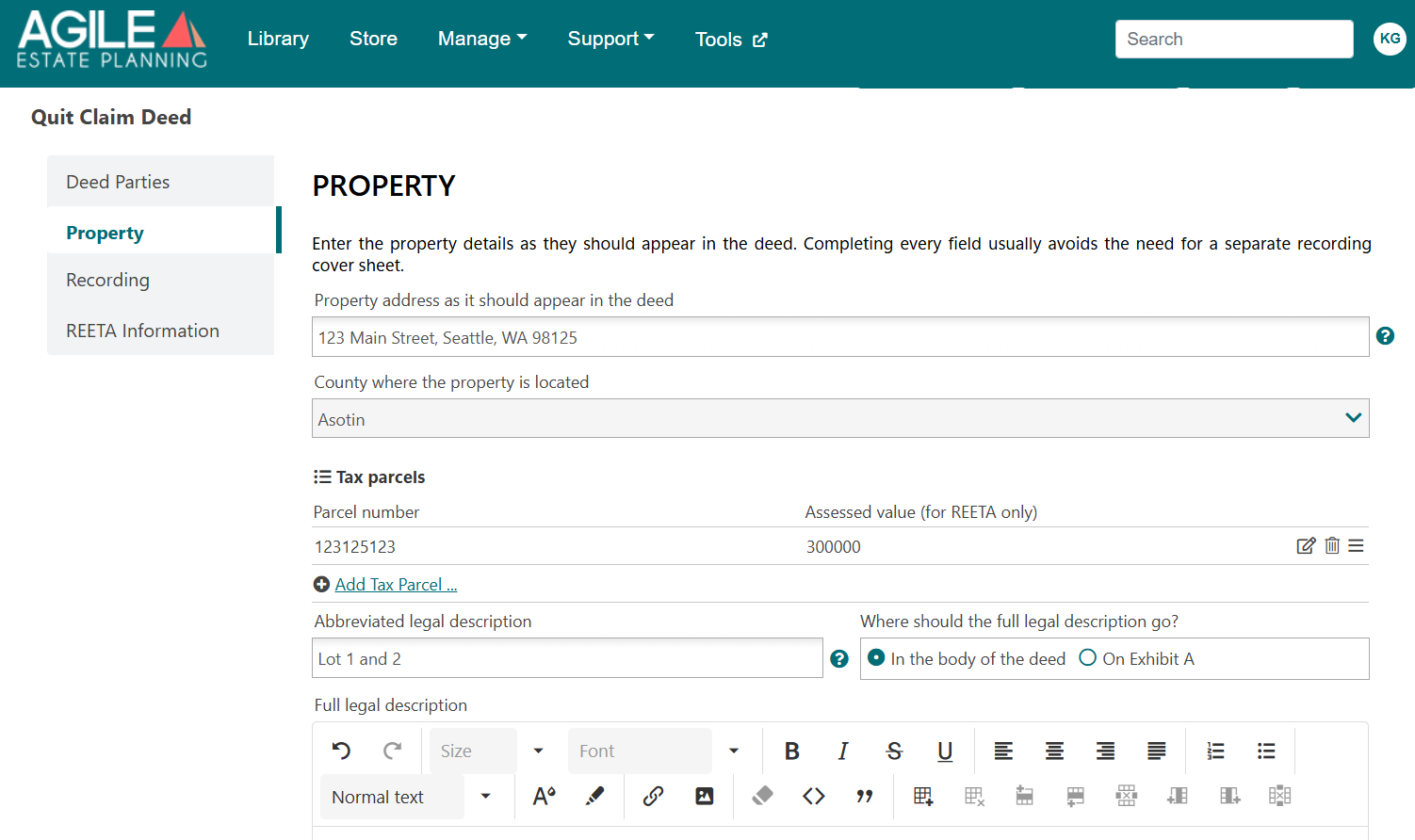
This tab collects the information that identifies the property being transferred. Enter the property address as it should appear in the deed, the county, and each tax parcel number.
You will also enter the abbreviated legal description, which prints on the first page with the parcel number. For the full legal description, choose whether it appears in the body of the deed or on an attached Exhibit A, then enter it exactly as it appears in the vesting deed or title report.
If you will prepare the REETA, also enter the assessed value of each tax parcel. The assessed value is used for the REETA only and does not appear in the deed.
Recording
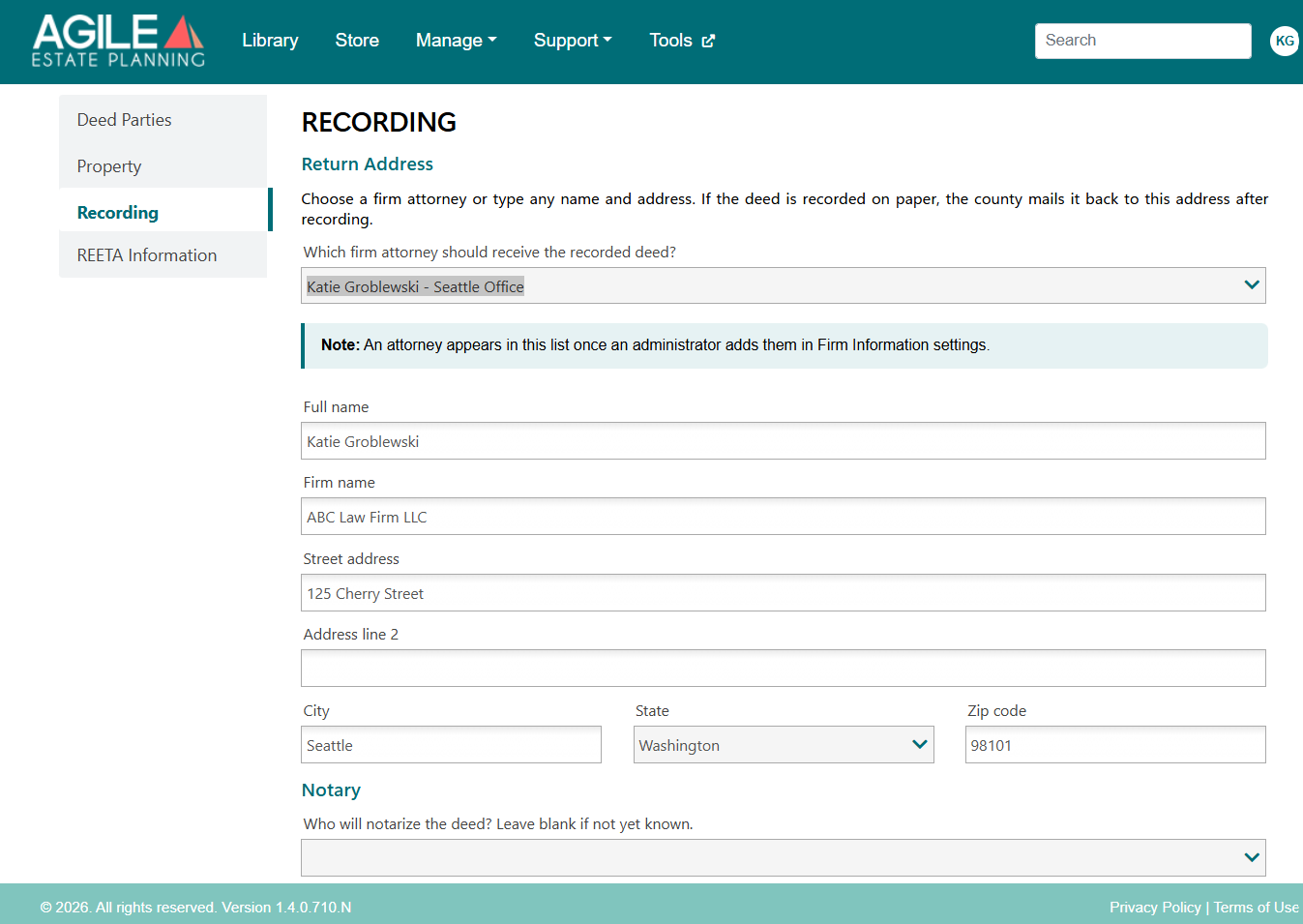
This tab sets up where the recorded deed is returned and who will notarize it.
Return Address: Select a firm attorney to fill in the return address, or type any name and address. If the deed is recorded on paper, the county mails the recorded deed back to this address. Attorneys appear in this list once an administrator adds them in Firm Information settings.
Notary: Select the notary who will acknowledge the deed, along with the state and county of the acknowledgment. If the notary is not yet known, you may leave this blank.
REETA Information
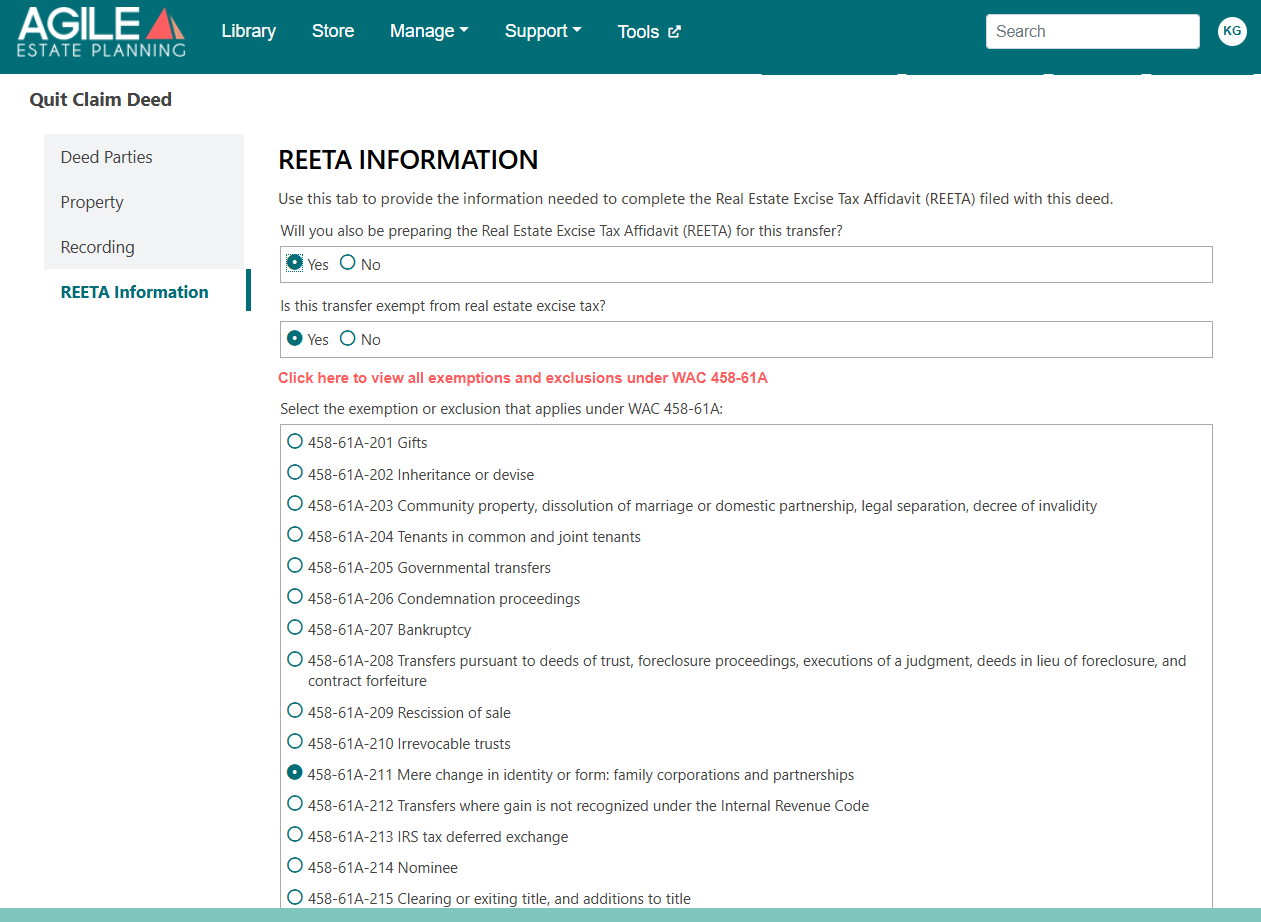
This tab collects the information needed to complete the Real Estate Excise Tax Affidavit (REETA) filed with the deed. It opens by asking whether you will also prepare the REETA for this transfer. Selecting No skips the rest of the tab, and no REETA is assembled.
Selecting Yes asks whether the transfer is exempt from real estate excise tax. If it is, select the exemption or exclusion that applies under WAC 458-61A. A link on the tab opens the full list of exemptions and exclusions. For many exemptions, a follow-up question asks which paragraph of the rule applies; for WAC 458-61A-202 (inheritance or devise), it asks which inheritance scenario applies.
The tab then asks for the Grantor’s mailing address and phone number, and whether the Grantee’s address is the same. If it is not, enter the Grantee’s mailing address and phone number.
Revocable Transfer on Death Deed
The Revocable Transfer on Death Deed names one or more beneficiaries who will receive the property at the owner’s death. The owner keeps full ownership during life and can revoke the deed. Its interview uses the Deed Parties, Property and Recording tabs, with the differences described below, and has no REETA Information tab.
Who Can Be a Grantor
The deed supports one Grantor, or two Grantors who are married to each other and are transferring their community property. With two Grantors, the deed always describes them as “a married couple as to their community property”. No other form of ownership is supported.
Each Grantor and each beneficiary must be an individual. Trusts and business entities are not supported on this deed.
What the Deed Generates
When assembled, the Revocable Transfer on Death Deed includes:
- A first page formatted for recording, with the return address, the tax parcel numbers, the abbreviated legal description and a line naming the parties.
- The designation of the beneficiaries, with the property divided as described below.
- The full legal description, either in the body of the deed or attached as Exhibit A.
- A statement that the property transfers to the beneficiaries at the Grantor’s death or, with two Grantors, at the death of both Grantors, and that each Grantor may revoke the deed as to their interest during life.
- A statement that the transfer at death is exempt from the Washington real estate excise tax as a transfer by inheritance, citing RCW 82.45.010(3)(b) and WAC 458-61A-202(6)(d).
- A signature line for each Grantor and a notary acknowledgment for the notary you select.
How the Deed Distributes the Property
Each beneficiary must survive the Grantor, or both Grantors, to take. The beneficiaries who survive share the property equally, as tenants in common.
- The share of a beneficiary who dies first goes to the other beneficiaries, not to that beneficiary’s children.
- If only one beneficiary survives, that beneficiary receives the entire property.
- If no beneficiary survives, the deed transfers nothing.
Two Grantors
With two Grantors, the deed has no effect at the first death. The beneficiaries take when the surviving spouse dies, and receive the interest that spouse owns at that time.
For the beneficiaries to receive the whole property, the estate plan should transfer the first spouse’s half to the surviving spouse at the first death, through a will or a community property agreement.
Deed Parties Tab
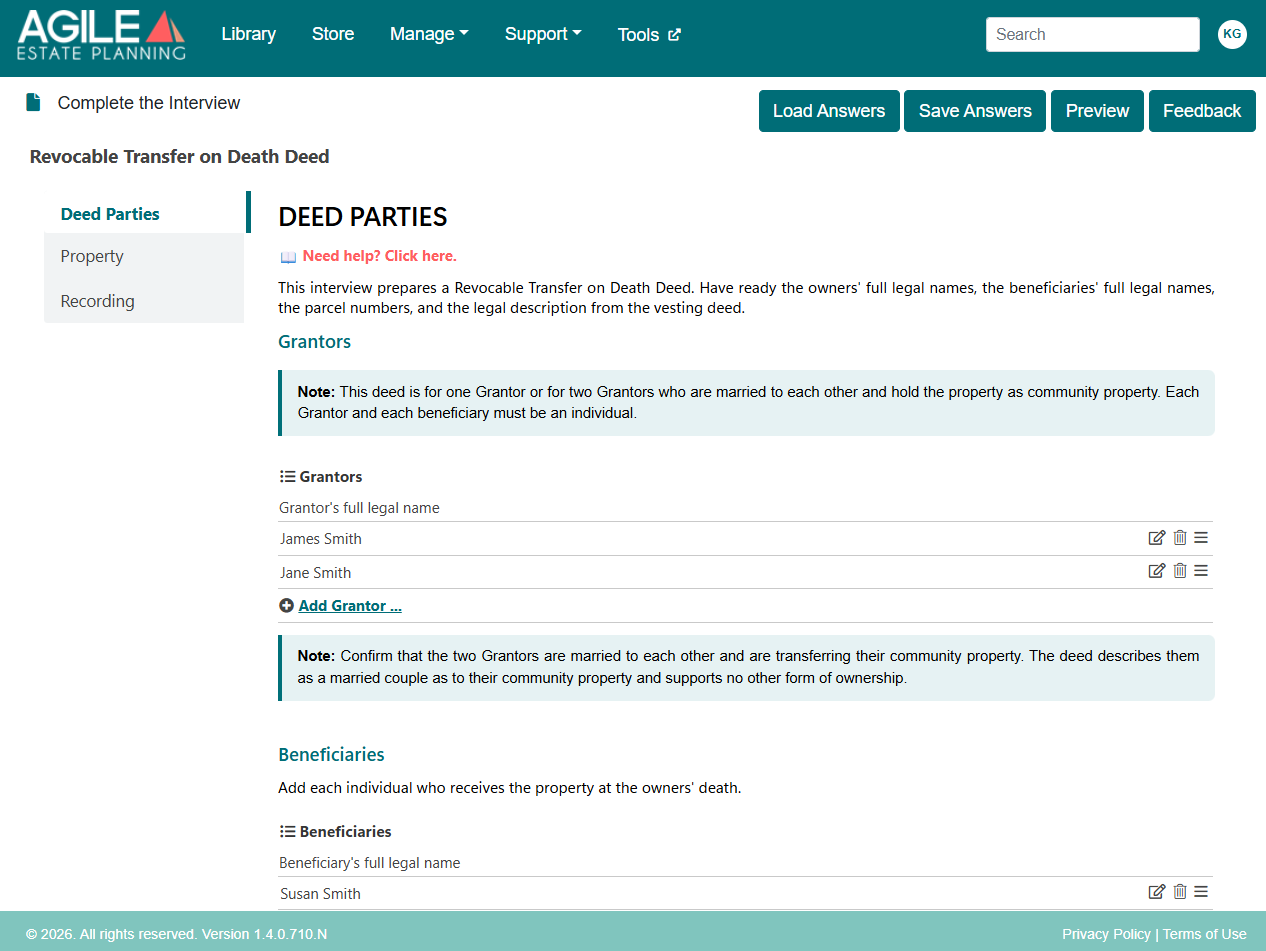
The tab opens with a short note listing what to have ready: the owners’ full legal names, the beneficiaries’ full legal names, the parcel numbers and the legal description from the vesting deed.
A teal Note at the top of the Grantors section states that the deed is for one Grantor, or for two Grantors who are married to each other and hold the property as community property. Click Add Grantor to add each owner signing the deed; the list asks only for each Grantor’s full legal name.
- Adding a second Grantor displays a second Note asking you to confirm that the Grantors are married to each other and are transferring their community property.
- Adding a third Grantor displays an Action Needed message asking you to remove the extra Grantors.
Under Beneficiaries, click Add Beneficiary to add each individual who will receive the property at the owners’ death. The list asks only for each beneficiary’s full legal name.
Once a beneficiary is added, a yellow Caution summarizes how the deed distributes the property, as described above. With two Grantors, the Caution also explains that the deed has no effect at the first death.
Property and Recording Tabs
The Property and Recording tabs work as described above for the other deeds.
Assemble Your Documents
When the interview is complete, you are ready to assemble the deed. For step-by-step instructions, see this article.